
Uses OpenAI to enable semantic search capabilities, allowing users to discover RAG-related MCP servers through natural language queries and embeddings-based matching.
RAGMap (RAG MCP Registry Finder)
RAGMap is a lightweight MCP Registry-compatible subregistry + MCP server focused on RAG-related MCP servers.
It:
Ingests the official MCP Registry, enriches records for RAG use-cases, and serves a subregistry API.
Exposes an MCP server (remote Streamable HTTP + local stdio) so agents can search/filter RAG MCP servers.
MapRag (RAGMap)
MapRag is a discovery + routing layer for retrieval. It helps agents and humans answer: which retrieval MCP server should I use for this task, given my constraints?
RAGMap does not do retrieval itself. It indexes and enriches retrieval-capable servers, then routes you to the right tool/server.
Features: Registry-compatible API; semantic + keyword search (when OPENAI_API_KEY is set, e.g. from env or your deployment’s secret manager); categories and ragScore; filter by hasRemote, reachable (HEAD-checked), citations, localOnly, transport, minScore, categories. Human browse UI at ragmap-api.web.app/browse — search, filter, copy Cursor/Claude config. MCP tools: rag_find_servers, rag_get_server, rag_list_categories, rag_explain_score.
Full overview: docs/OVERVIEW.md
Related MCP server: MCP-Ragdocs
Architecture
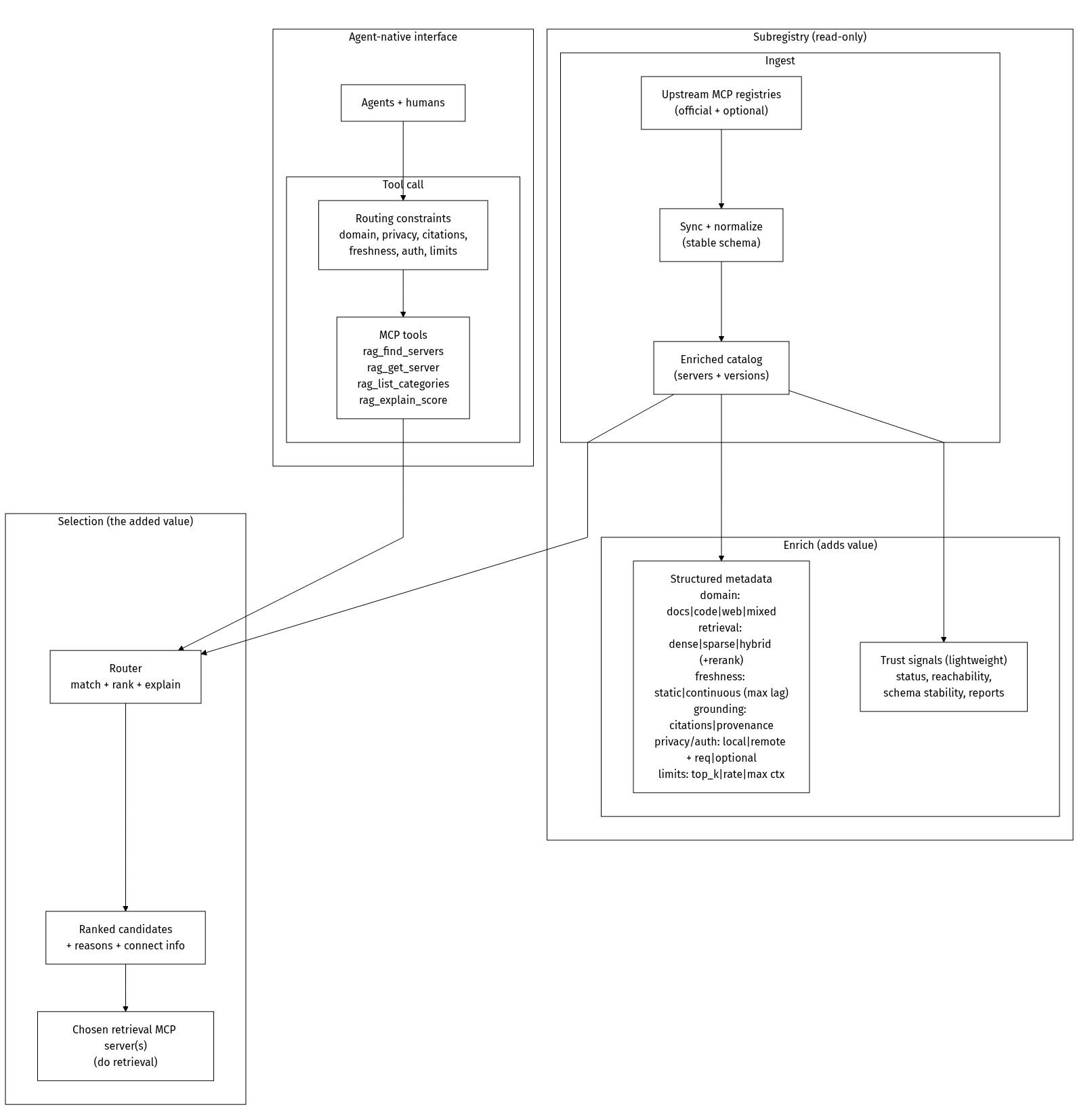
Monorepo layout
apps/api: REST API + MCP registry-compatible endpoints + ingestion workerapps/mcp-remote: Remote MCP server (Streamable HTTP)packages/mcp-local: Local MCP server (stdio)packages/shared: Zod schemas + shared typesdocs: docs + Firebase Hosting static assets
Local dev
Optional: set OPENAI_API_KEY in .env (see .env.example) to enable semantic search locally; GET /health will show "embeddings": true.
API: http://localhost:3000
MCP remote: http://localhost:4000/mcp
Ingest
MCP usage
Remote (Streamable HTTP):
Local (stdio, npm):
Local (stdio):
Key endpoints
GET /embed— embeddable “Search RAG MCP servers” widget (iframe; query params:q,limit)GET /health(includesembeddings: true|falsewhen semantic search is on/off)GET /readyzGET /v0.1/serversGET /v0.1/servers/:serverName/versionsGET /v0.1/servers/:serverName/versions/:version(supportslatest)GET /rag/searchGET /rag/categoriesGET /api/stats(public usage aggregates; no PII)GET /api/usage-graph(HTML chart of usage)POST /internal/ingest/run(protected)
GET /rag/search query params:
q(string)categories(comma-separated)minScore(0-100)transport(stdioorstreamable-http)registryType(string)hasRemote(trueorfalse— only servers with a remote endpoint)reachable(true— only servers whose streamable-http URL passed a HEAD check)citations(true— only servers that mention citations/grounding in metadata)localOnly(true— only stdio, no remote)
Smoke tests
Docs
docs/DISCOVERY-LINK-CONVENTION.md— optionaldiscoveryServicein server.json so clients can show “Discover more”docs/AGENT-USAGE.md— for agents: discovery, REST API, MCP install (no human intervention)docs/DEPLOYMENT.mddocs/OVERVIEW.mddocs/DATA_MODEL.mddocs/PRIVACY.mddocs/PUBLISHING.mddocs/GLAMA-CHECKLIST.mddocs/GLAMA-DOCKERFILE.mdscripts/glama-score-status.sh— print public Glama score flags (inspectable/release/usage)