
The All-in-MCP server provides academic paper search, PDF processing, and GitHub repository access through a modular FastMCP architecture.
Academic Paper Search - Search across IACR ePrint Archive, CryptoBib, Google Scholar, Crossref, and DBLP with filtering by year, conference, and other parameters
PDF Management - Download PDFs from IACR ePrint Archive, extract text content from local or online PDFs with customizable page ranges
GitHub Repository Tools - Retrieve directory structures, navigate specific paths, and read file contents from any GitHub repository
Configuration & Integration - Configure modular backends through environment variables (APaper, GitHub-Repo-MCP), run as standalone servers or through a proxy, integrate with MCP clients like VSCode and Claude Code, and debug using MCP Inspector
Click on "Install Server".
Wait a few minutes for the server to deploy. Once ready, it will show a "Started" state.
In the chat, type
@followed by the MCP server name and your instructions, e.g., "@All-in-MCPsearch for recent papers about post-quantum cryptography on IACR"
That's it! The server will respond to your query, and you can continue using it as needed.
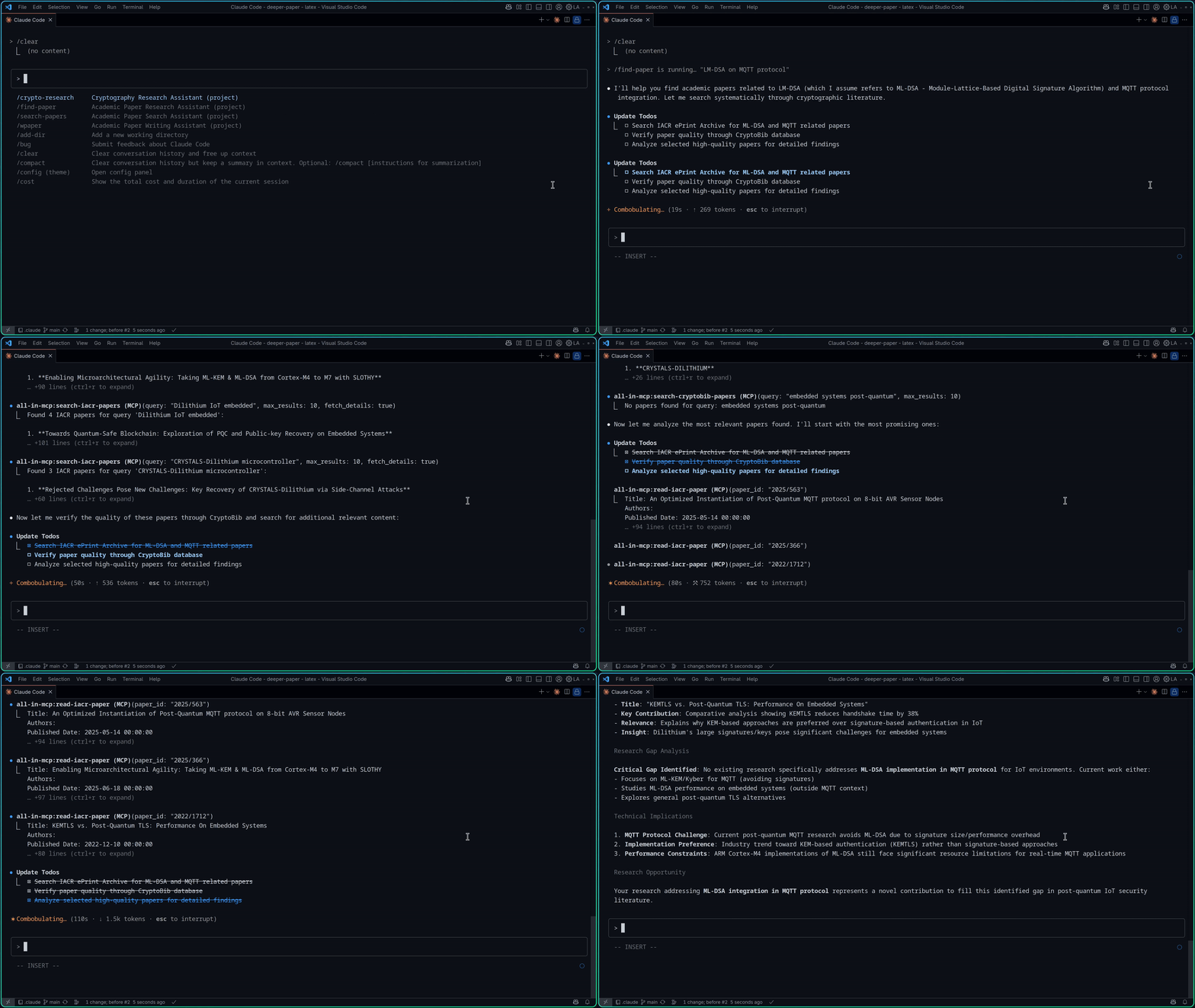
Here is a step-by-step guide with screenshots.
All-in-MCP
A FastMCP-based Model Context Protocol (MCP) server providing academic paper search, web search, and PDF processing utilities. Features a modular architecture with both proxy and standalone server capabilities.
Architecture
All-in-MCP uses a modern FastMCP architecture with three main components:
🔄 All-in-MCP Proxy Server: Main server that routes requests to academic tools and web search
📚 APaper Module: Isolated academic research server with specialized paper search tools
🔍 Qwen Search Module: Web search server powered by Qwen/Dashscope API with SSE-based MCP
This design provides better modularity, performance, and scalability.
Features
All servers expose search tools as FastMCP endpoints with automatic tool registration:
Available Tools
Category | Tool Name | Description | Backend |
Academic Research |
| Search academic papers from IACR ePrint Archive | APaper |
| Download PDF of an IACR ePrint paper | APaper | |
| Read and extract text content from an IACR ePrint paper PDF | APaper | |
Bibliography Search |
| Search DBLP computer science bibliography database | APaper |
Cross-platform Search |
| Search academic papers across disciplines with citation data | APaper |
Web Search |
| Search the web using Qwen/Dashscope API | Qwen Search |
GitHub Repository |
| Get all directories from a GitHub repository | GitHub-Repo-MCP |
| Get directories from a specific path in GitHub repository | GitHub-Repo-MCP | |
| Get file content from GitHub repository | GitHub-Repo-MCP |
All tools are implemented using FastMCP decorators with automatic registration, built-in validation, and enhanced error handling.
Quick Start
Prerequisites
Python 3.10 or higher
pipxfor Python package installationnpxfor MCP Inspector (Node.js required)
Integration with MCP Clients
Add the servers to your MCP client configuration:
VSCode Configuration (.vscode/mcp.json)
Claude Code Configuration (.mcp.json)
Server Options
The main proxy server supports multiple MCP backends through environment variables:
Note: If you have the package installed globally, you can also run directly:
all-in-mcporqwen-search
Debugging & Testing
MCP Inspector
Use the official MCP Inspector to debug and test server functionality:
Local Development with uv
When developing locally, use uv run to debug specific MCP functions:
The MCP Inspector provides:
🔍 Interactive Tool Testing: Test all available tools with real parameters
📊 Server Information: View server capabilities and tool schemas
🐛 Debug Messages: Monitor server communication and error messages
⚡ Real-time Testing: Execute tools and see results immediately
Perfect for development, debugging, and understanding how the FastMCP tools work.
For development setup and contribution guidelines, see the Development Guide.