---
url: "https://docs.portone.cloud/docs/invoice-life-cycle"
title: "Invoice Life Cycle"
---
## Life Cycle Overview [Skip link to Life Cycle Overview](https://docs.portone.cloud/docs/invoice-life-cycle\#life-cycle-overview)
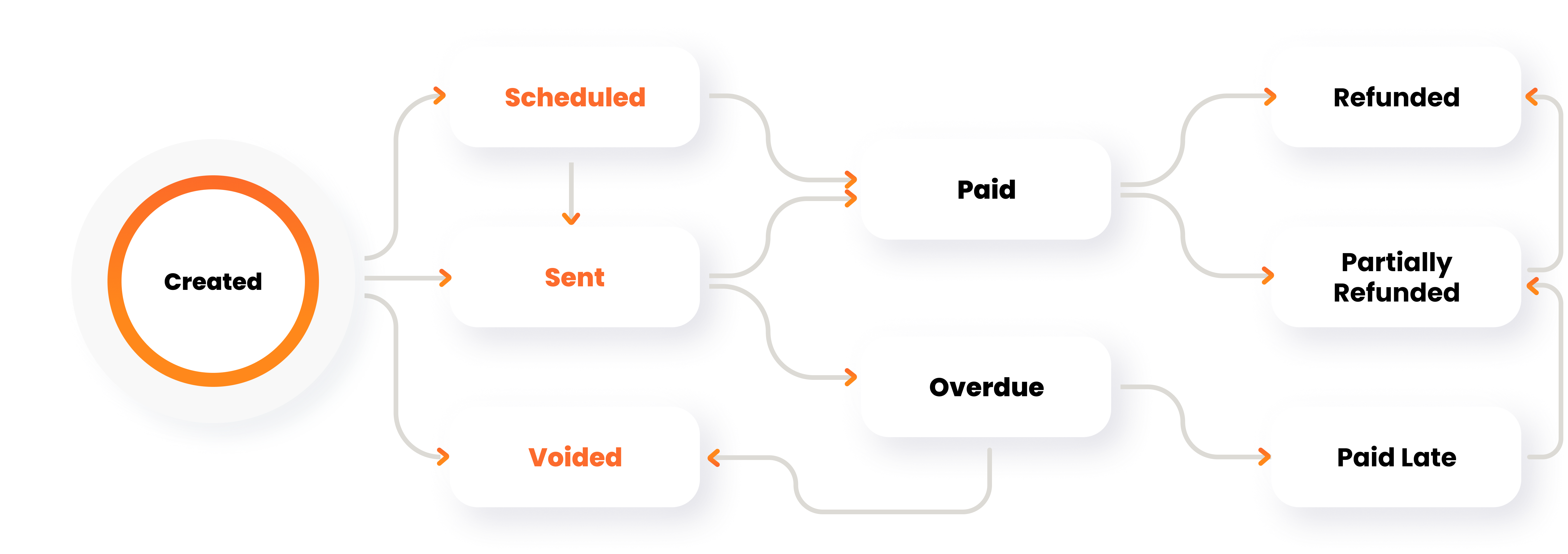
The invoice life cycle outlines the different statuses an invoice can transition through from creation to completion. This diagram provides a clear representation of the various stages and transitions in the life cycle of an invoice. Below is the detailed explanation:
### CREATED [Skip link to CREATED](https://docs.portone.cloud/docs/invoice-life-cycle\#created)
- **Description**:
- This is the initial stage of an invoice. The invoice is created but not yet finalized or shared with the customer.
- **Actions**:
- Edit and make changes to invoice details like customer information, item details, and payment terms.
- Save the invoice as a draft for future use or further editing.
- **Possible Transitions**:
- **Scheduled**: The invoice is scheduled to be sent at a later date.
- **Sent**: The invoice is finalized and sent to the customer.
- **Voided**: The draft is discarded and marked as void.
### SCHEDULED [Skip link to SCHEDULED](https://docs.portone.cloud/docs/invoice-life-cycle\#scheduled)
- **Description**:
- The invoice is finalized and scheduled to be sent to the customer at a specific date and time.
- **Actions**:
- Configure a send date for the invoice.
- Make minor edits or cancel the schedule.
- **Possible Transitions**:
- **Sent**: The invoice is successfully sent to the customer.
- **Draft**: The scheduling is canceled, and the invoice is reverted to a draft.
- **Voided**: The scheduled invoice is canceled and marked as void.
### SENT [Skip link to SENT](https://docs.portone.cloud/docs/invoice-life-cycle\#sent)
- **Description**:
- The invoice is sent to the customer and is awaiting payment.
- **Actions**:
- Customers can view the invoice and proceed with payment.
- Business owners can track the status of the invoice.
- **Possible Transitions**:
- **Paid**: The invoice is fully paid.
- **Overdue**: The payment due date is missed.
- **Voided**: The invoice is canceled after being sent.
### OVERDUE [Skip link to OVERDUE](https://docs.portone.cloud/docs/invoice-life-cycle\#overdue)
- **Description**:
- The invoice remains unpaid past the due date.
- **Actions**:
- Send reminders to the customer for payment.
- Apply late fees or penalties (if applicable).
- **Possible Transitions**:
- **Paid Late**: The customer pays the invoice after the due date.
- **Voided**: The invoice is canceled despite being overdue.
### PAID [Skip link to PAID](https://docs.portone.cloud/docs/invoice-life-cycle\#paid)
- **Description**:
- The invoice is fully paid by the customer.
- **Actions**:
- Issue a receipt or acknowledgment to the customer.
- No further actions required unless a refund is requested.
- **Possible Transitions**:
- **Partially Refunded**: A partial refund is issued for the payment.
- **Refunded**: The full amount is refunded to the customer.
### PAID LATE [Skip link to PAID LATE](https://docs.portone.cloud/docs/invoice-life-cycle\#paid-late)
- **Description**:
- The invoice is paid after the due date.
- **Actions**:
- Apply any late payment penalties (if applicable).
- Mark the invoice as "Paid Late" for tracking purposes.
- **Possible Transitions**:
- **Partially Refunded**: A partial refund is issued for the payment.
- **Refunded**: The full amount is refunded to the customer.
### PARTIALLY REFUNDED [Skip link to PARTIALLY REFUNDED](https://docs.portone.cloud/docs/invoice-life-cycle\#partially-refunded)
- **Description**:
- A partial refund is issued for a previously paid invoice.
- **Actions**:
- Specify the refund amount and reason.
- Issue the partial refund to the customer.
- **Possible Transitions**:
- **Refunded**: The remaining amount is refunded, completing the full refund process.
### REFUNDED [Skip link to REFUNDED](https://docs.portone.cloud/docs/invoice-life-cycle\#refunded)
- **Description**:
- The entire amount of the paid invoice is refunded to the customer.
- **Actions**:
- Issue the refund and update the invoice status.
- **Possible Transitions**:
- None (final state).
### VOIDED [Skip link to VOIDED](https://docs.portone.cloud/docs/invoice-life-cycle\#voided)
- **Description**:
- The invoice is canceled and is no longer valid.
- **Actions**:
- Mark the invoice as void to prevent it from being processed further.
- **Possible Transitions**:
- None (final state).
## Summary of Invoice Statuses [Skip link to Summary of Invoice Statuses](https://docs.portone.cloud/docs/invoice-life-cycle\#summary-of-invoice-statuses)
| **Status** | **Description** | **Possible Next Statuses** |
| --- | --- | --- |
| Created | Initial stage of invoice creation. | Scheduled, Sent, Voided |
| Scheduled | Invoice is set to be sent on a specified date. | Sent, Draft, Voided |
| Sent | Invoice is sent to the customer and awaiting payment. | Paid, Overdue, Voided |
| Overdue | Payment not received by the due date. | Paid Late, Voided |
| Paid | Invoice is fully paid. | Partially Refunded, Refunded |
| Paid Late | Invoice is paid after the due date. | Partially Refunded, Refunded |
| Partially Refunded | A partial refund is issued for the invoice. | Refunded |
| Refunded | Full amount of the invoice is refunded. | None (final state) |
| Voided | Invoice is canceled and cannot be used further. | None (final state) |
This invoice life cycle ensures a clear and organized process for managing invoices at every stage, enhancing both business efficiency and customer satisfaction.
