
ProDisco is a progressive-disclosure MCP server framework that indexes TypeScript library APIs for discovery and executes code in a sandboxed environment, returning console output to agents.
Core Capabilities:
Dynamic API Discovery - Search and browse API documentation (methods, types, functions, cached scripts) extracted from TypeScript libraries via
.d.tsfiles or ESM JavaScript fallbackSandboxed Code Execution - Execute TypeScript code in an isolated environment with restricted access to only pre-configured npm packages and environment variables
Multiple Execution Modes - Supports blocking, real-time streaming, async (background), and cached script execution, with status checking and cancellation
Flexible Library Configuration - Configure which npm packages to index and allow via YAML/JSON files, with optional auto-installation into
.cache/depsVersatile Deployment - Supports stdio (default) and HTTP transport with session management, SSE streaming, and containerized sandbox deployment (e.g., Kubernetes) using TCP/gRPC communication
Security Options - TLS and mutual TLS (mTLS) support for production deployments
Advanced Analytics - Statistical analysis, machine learning, linear algebra, and signal processing via libraries like
simple-statistics,ml-regression,mathjs, andfft-jsZero Maintenance - Automatically extracts methods from library type definitions, staying current with dependency upgrades
Key Tools:
prodisco.searchTools- Search extracted API documentation by method name, type, library, or categoryprodisco.runSandbox- Execute TypeScript code with captured console output
Example Use Cases:
Query Kubernetes clusters via
@kubernetes/client-nodeAnalyze Prometheus metrics with PromQL execution
Query Loki logs using LogQL
Detect anomalies, memory leaks, and capacity issues
Perform trend forecasting and correlation analysis on operational data
Provides tools for managing and inspecting Kubernetes clusters, including listing nodes, pods, and other resources across namespaces, viewing logs, and executing operations through TypeScript modules that agents discover and use progressively.
Click on "Install Server".
Wait a few minutes for the server to deploy. Once ready, it will show a "Started" state.
In the chat, type
@followed by the MCP server name and your instructions, e.g., "@ProDiscolist all pods in the default namespace with their status"
That's it! The server will respond to your query, and you can continue using it as needed.
Here is a step-by-step guide with screenshots.
ProDisco (Progressive Disclosure MCP Server)
ProDisco is a progressive-disclosure MCP server framework: you provide a list of TypeScript libraries, ProDisco indexes their APIs for discovery, and a sandbox executes code that uses only those libraries. It follows Anthropic's Progressive Disclosure pattern: the MCP server exposes search tools which surface library APIs, agents discover them to write code, execute it in a sandbox, and only the final console output returns to the agent.
Kubernetes/observability is just one example configuration (see examples/). You can equally build an MCP server around AWS/GCP SDKs, Postgres clients, internal TypeScript SDKs, etc.
Note: ProDisco prefers indexing APIs from TypeScript declaration files (
.d.ts). If a library ships no.d.ts, ProDisco can fall back to indexing ESM JavaScript exports (best-effort; types default toany). CommonJS-only JavaScript packages without typings are not supported.
Demo use-cases (optional):
Kubernetes access via
@kubernetes/client-nodePrometheus metrics via
@prodisco/prometheus-clientLoki logs via
@prodisco/loki-clientAnalytics via
simple-statistics
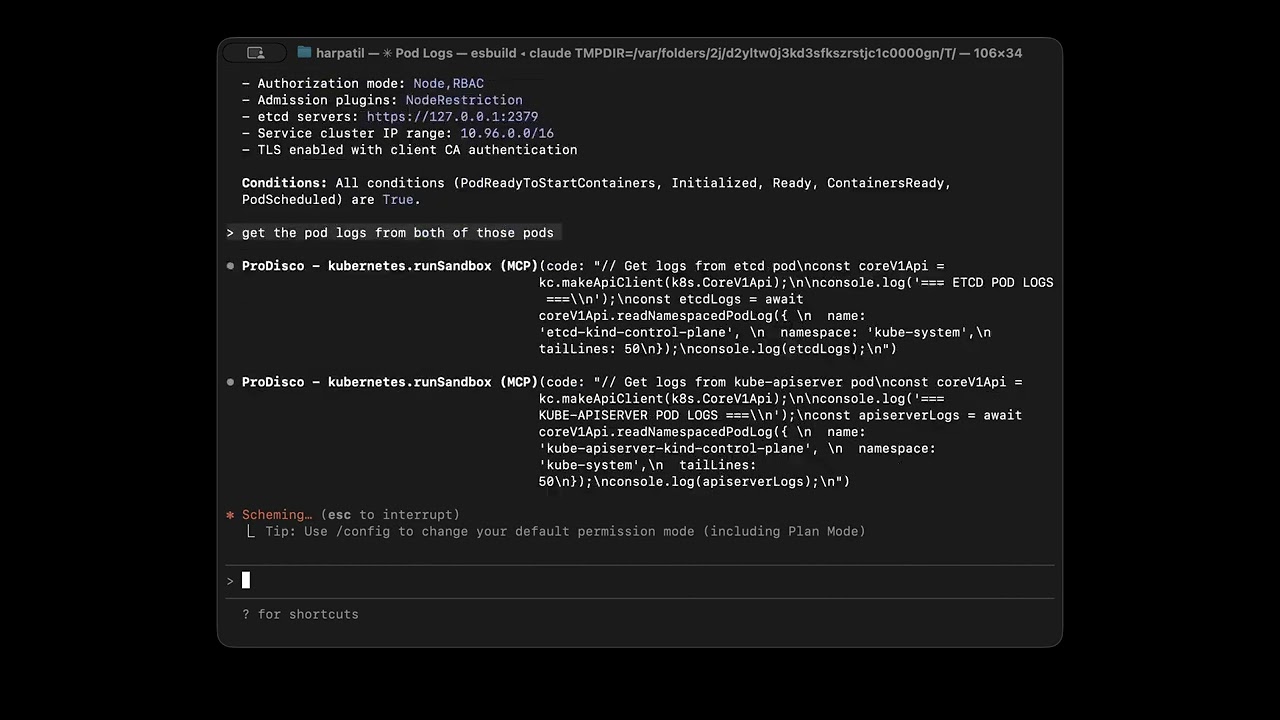
Table of Contents
Why Progressive Disclosure?
Anthropic's latest guidance explains why MCP servers should progressively reveal capabilities instead of dumping every tool definition into the model context. When agents explore a filesystem of TypeScript modules, they only load what they need and process data inside the execution environment, then return a concise result to the chat. This keeps token usage low, improves latency, and avoids copying large intermediate payloads through the model (source).
ProDisco goes a step further: instead of exposing custom TypeScript modules, it provides a structured parameter search tool that dynamically extracts methods from upstream libraries using TypeScript AST parsing. This means:
Zero maintenance - Methods are extracted directly from library
.d.tsfilesAlways current - Upgrading a dependency automatically exposes new methods
Type-safe - Full parameter types and return types included
Quick Start
Add to Claude Code
Remove if needed:
Environment Variables
Variable | Required | Description |
| No | Path to the libraries config file (same as |
| No | (If using |
| No | (If using |
| No | (If using |
Important: Export environment variables before running
claude mcp add. The--envflag may not reliably pass variables to the MCP server process.
Tip: If you're using a kind cluster for local testing, you can port-forward to Prometheus:
kubectl port-forward -n monitoring svc/prometheus-server 9090:80Then set
PROMETHEUS_URL="http://localhost:9090"
Development Setup
For local development:
Startup Options:
Flag | Description |
| Clear the scripts cache before starting |
| Path to YAML/JSON config listing libraries to index/allow |
| Transport mode: |
| HTTP host to bind to (default: |
| HTTP port (default: |
Dynamic Libraries Configuration
ProDisco can be started with a config file that determines which npm packages are:
Indexed by
prodisco.searchToolsAllowed in the sandbox via
require()(kept in lockstep with indexing)
Example prodisco.config.yaml:
Start with a config file:
Missing packages are automatically installed into .cache/deps on startup.
Environment variables:
Variable | Description |
| Path to YAML/JSON config listing libraries |
Build Docker Images From Config
If you want images that already contain the configured libraries (for deploying MCP and sandbox separately), you can build them directly from the same config file:
This builds:
prodisco/mcp-server:<configSha8>using the rootDockerfileprodisco/sandbox-server:<configSha8>usingpackages/sandbox-server/Dockerfile
You can override image names/tags:
HTTP Transport
ProDisco supports HTTP transport for network-based MCP connections, enabling remote access and containerized deployments.
Start in HTTP mode:
Environment Variables:
Variable | Default | Description |
|
| Transport mode ( |
|
| HTTP host to bind to |
|
| HTTP port to listen on |
HTTP Endpoints:
Endpoint | Method | Description |
| GET | Health check, returns |
| POST | MCP JSON-RPC endpoint (Streamable HTTP) |
Example: Connect with curl
The HTTP transport uses the MCP SDK's StreamableHTTPServerTransport, which supports session management via mcp-session-id headers and Server-Sent Events (SSE) for streaming responses.
Available Tools
ProDisco exposes two tools:
prodisco.searchTools
Search and browse extracted API documentation for your startup-configured TypeScript libraries (from .d.ts). Use it to discover the correct method/type/function signatures before calling prodisco.runSandbox.
Document Types:
Type | Description |
| Class methods / instance APIs extracted from configured libraries |
| TypeScript types (interfaces/classes/enums/type aliases) |
| Standalone exported functions |
| Cached sandbox scripts |
| Search everything above (default) |
Examples:
For comprehensive documentation, see docs/search-tools.md.
prodisco.runSandbox
Execute TypeScript code in a sandboxed environment using the same configured library allowlist as prodisco.searchTools.
Execution Modes:
Mode | Purpose | Key Parameters |
| Blocking execution |
|
| Real-time output streaming |
|
| Background execution |
|
| Check async execution |
|
| Cancel running execution |
|
| List active executions |
|
Sandbox Environment:
console- Captured output (log, error, warn, info)require()- Restricted to configured npm packages (and their subpaths)process.env- Environment variables
Examples:
For architecture details, see docs/grpc-sandbox-architecture.md.
Advanced Analytics
ProDisco goes beyond simple resource fetching - it provides statistical analysis, machine learning, and signal processing capabilities for deep cluster observability.
Available Libraries:
Library | Purpose |
| Mean, median, std dev, z-scores, percentiles, linear regression, correlation |
| Polynomial, exponential, and power regression for trend forecasting |
| Matrix operations, linear algebra, symbolic math |
| Fast Fourier Transform for detecting periodic patterns |
Example Prompts:
Use Case | Prompt |
Log Analysis | "Query Loki for error logs from the nginx app in the last hour. Show me the most common error patterns." |
Cluster Health | "Analyze CPU and memory usage across all pods. Calculate mean, median, standard deviation, and identify outliers using z-scores. Show pods above the 95th percentile." |
Memory Leaks | "Check for memory leaks. Fetch memory usage over 2 hours and use linear regression to identify pods with increasing memory." |
Anomaly Detection | "Analyze network traffic and detect anomalies. Find receive/transmit rates more than 2 standard deviations from normal." |
Correlation | "Find correlations between CPU and memory usage. Tell me if high CPU correlates with high memory." |
Periodic Patterns | "Use FFT analysis on node CPU to detect periodic patterns. Are there dominant frequencies suggesting scheduled jobs?" |
Capacity Planning | "Analyze resource trends and use polynomial regression to forecast when we might hit resource limits." |
For detailed examples with code and output, see docs/analytics.md.
Advanced Deployment
Container Isolation
For stronger isolation, run the sandbox server in a Kubernetes cluster and connect via TCP.
1. Deploy the sandbox server:
2. Configure the MCP server to use TCP:
Transport Environment Variables:
Variable | Default | Description |
|
| Use TCP instead of local subprocess |
|
| Sandbox server host |
|
| Sandbox server port |
Transport Security (TLS/mTLS)
For production deployments, the sandbox server supports TLS and mutual TLS (mTLS):
Mode | Description |
| No encryption (default, for local development) |
| Server-side TLS (client verifies server identity) |
| Mutual TLS (both client and server authenticate) |
Configuration:
For Kubernetes deployments, use cert-manager to automate certificate management. See the k8s/cert-manager directory for ready-to-use manifests.
For full architecture and security details, see docs/grpc-sandbox-architecture.md.
Testing
Integration Tests
End-to-end testing with KIND cluster + Claude Agent SDK:
For detailed testing instructions, see docs/integration-testing.md.
Additional Documentation
Document | Description |
Advanced analytics guide - anomaly detection, forecasting, correlation, FFT analysis | |
Complete searchTools reference with examples and technical architecture | |
Practical examples + runnable library config files ( | |
Sandbox architecture, gRPC protocol, and security configuration | |
Integration test workflow and container tests |
License
MIT