
The ipybox server provides a secure, sandboxed IPython kernel environment in a Docker container for executing Python code with state preservation across executions.
Execute Python code securely within a stateful IPython kernel that preserves variables, imports, and definitions across calls
Support direct execution of asynchronous Python code within the kernel's active event loop
Install Python packages at runtime using
!pip installcommandsUpload files from the host to the container's
/appdirectory for use in code executionDownload files from the container's
/appdirectory to retrieve results or generated artifactsStream code execution output as it is generated
Return plots generated with visualization libraries
Reset the IPython kernel to a clean state, clearing memory while preserving installed packages and files
Provides secure Python code execution in Docker containers with IPython kernels, supporting data analytics, package installation, and plot generation with configurable network restrictions
Enables safe execution of Python code through IPython kernels in sandboxed environments, supporting stateful code execution, package management, and visualization library output
Click on "Install Server".
Wait a few minutes for the server to deploy. Once ready, it will show a "Started" state.
In the chat, type
@followed by the MCP server name and your instructions, e.g., "@ipyboxrun this Python code to calculate the average of these numbers: [45, 67, 89, 23, 56]"
That's it! The server will respond to your query, and you can continue using it as needed.
Here is a step-by-step guide with screenshots.
ipybox
mcp-name: io.github.gradion-ai/ipybox
Next generation ipybox
This is the next generation of ipybox, a complete rewrite. Older versions are maintained on the 0.6.x branch and can be obtained with pip install ipybox<0.7.
ipybox is a Python code execution sandbox with first-class support for programmatic MCP tool calling. It generates a typed Python tool API from MCP server tool schemas, supporting both local stdio and remote HTTP servers. Code that calls the generated API executes in a sandboxed IPython kernel, providing a stateful environment where variables and definitions persist across executions. The generated API delegates MCP tool execution to a separate environment that enforces tool call approval, requiring applications to explicitly accept or reject each tool call before it executes.
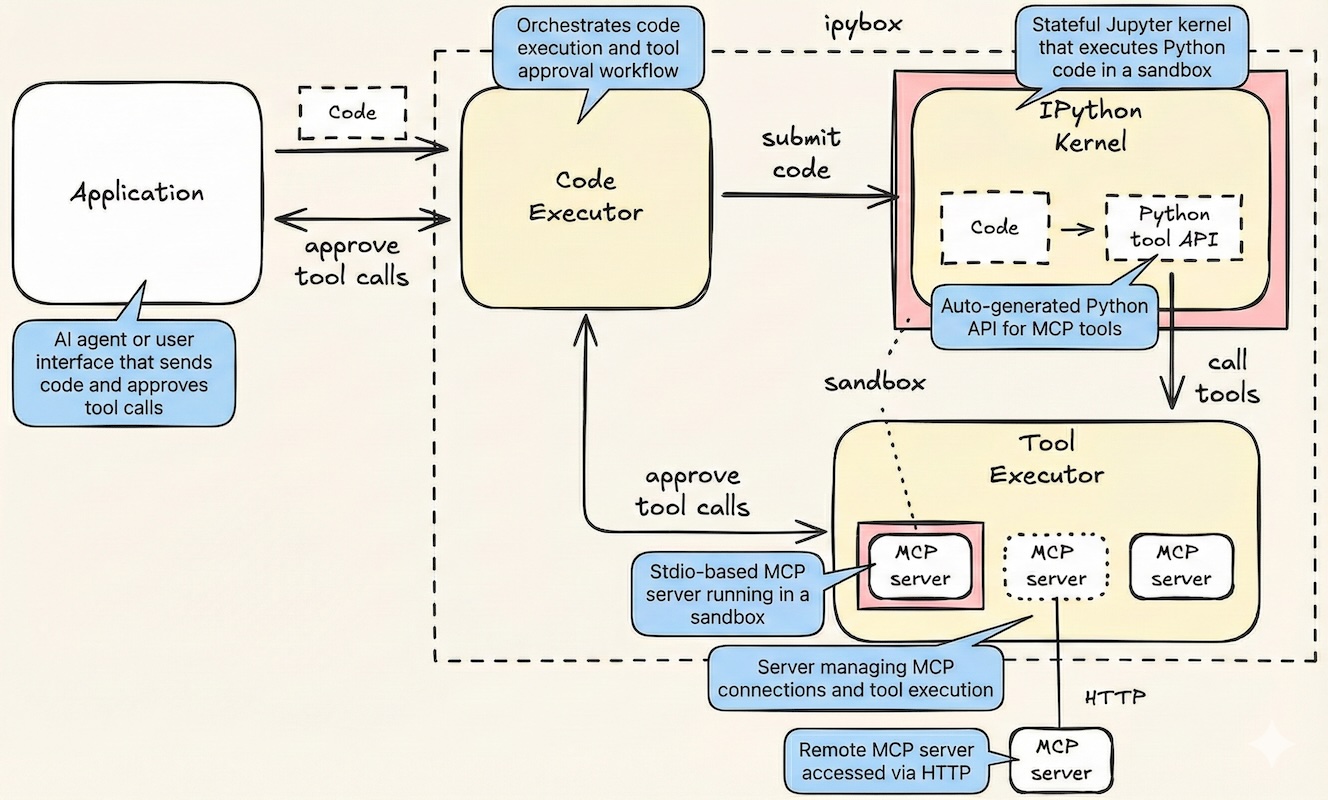
CodeExecutor
Documentation:
Related MCP server: Sandbox MCP Server
Agent integration
ipybox is designed for agents that interact with their environment through code actions rather than JSON tool calls, a more reliable approach since LLMs are heavily pretrained on Python code compared to JSON tool call post-training. Agents generate and execute Python code that composes multiple MCP tool calls into a single action, using loops, conditionals, and data transformations that keep intermediate results out of the agent's context window. Since agent-generated code cannot be trusted, it must run in a secure sandboxed environment, and all MCP tool calls must be approved by the application. ipybox supports both with minimal setup.
freeact
A code action agent built on ipybox is freeact. In addition to inheriting the features of ipybox, it supports progressive loading of tools and agent skills, and can save successful code actions as tools, evolving its own tool library over time.
Features
Stateful code execution — state persists across executions in IPython kernels
Lightweight sandboxing — kernel isolation via Anthropic's sandbox-runtime
Generated Python tool API — functions and models generated from MCP tool schemas
Programmatic MCP tool calling — MCP tools called via Python code, not JSON directly
MCP tool call approval — every MCP tool call requires application-level approval
Any MCP server — supports stdio, Streamable HTTP, and SSE transports
Any Python package — install and use any Python package in IPython kernels
Local code execution — no cloud dependencies, everything runs on your machine
Python SDK and MCP server — use ipybox programmatically or as an MCP server
Claude Code plugin — a plugin for programmatic tool calling in Claude Code