# backlog-mcp
A task backlog MCP server for LLM agents. Works with any MCP client — Claude, Kiro, Cursor, Codex, etc.
Agents create tasks, track progress, attach artifacts, and search across everything. Humans get a real-time web viewer to see what agents are doing.
> **Quick start**: Tell your LLM: `Add backlog-mcp to .mcp.json and use it to track tasks`
## What's Inside
This is a monorepo with 4 packages:
| Package | npm | What it does |
|---------|-----|-------------|
| [`packages/server`](packages/server) | [`backlog-mcp`](https://www.npmjs.com/package/backlog-mcp) | MCP server, HTTP API, CLI |
| [`packages/framework`](packages/framework) | [`@nisli/core`](https://www.npmjs.com/package/@nisli/core) | Reactive web component framework (zero deps) |
| [`packages/viewer`](packages/viewer) | — | Web UI built on the framework |
| [`packages/shared`](packages/shared) | — | Shared entity types and ID utilities |
## Installation
Add to your MCP config (`.mcp.json` or your MCP client config):
```json
{
"mcpServers": {
"backlog": {
"command": "npx",
"args": ["-y", "backlog-mcp"]
}
}
}
```
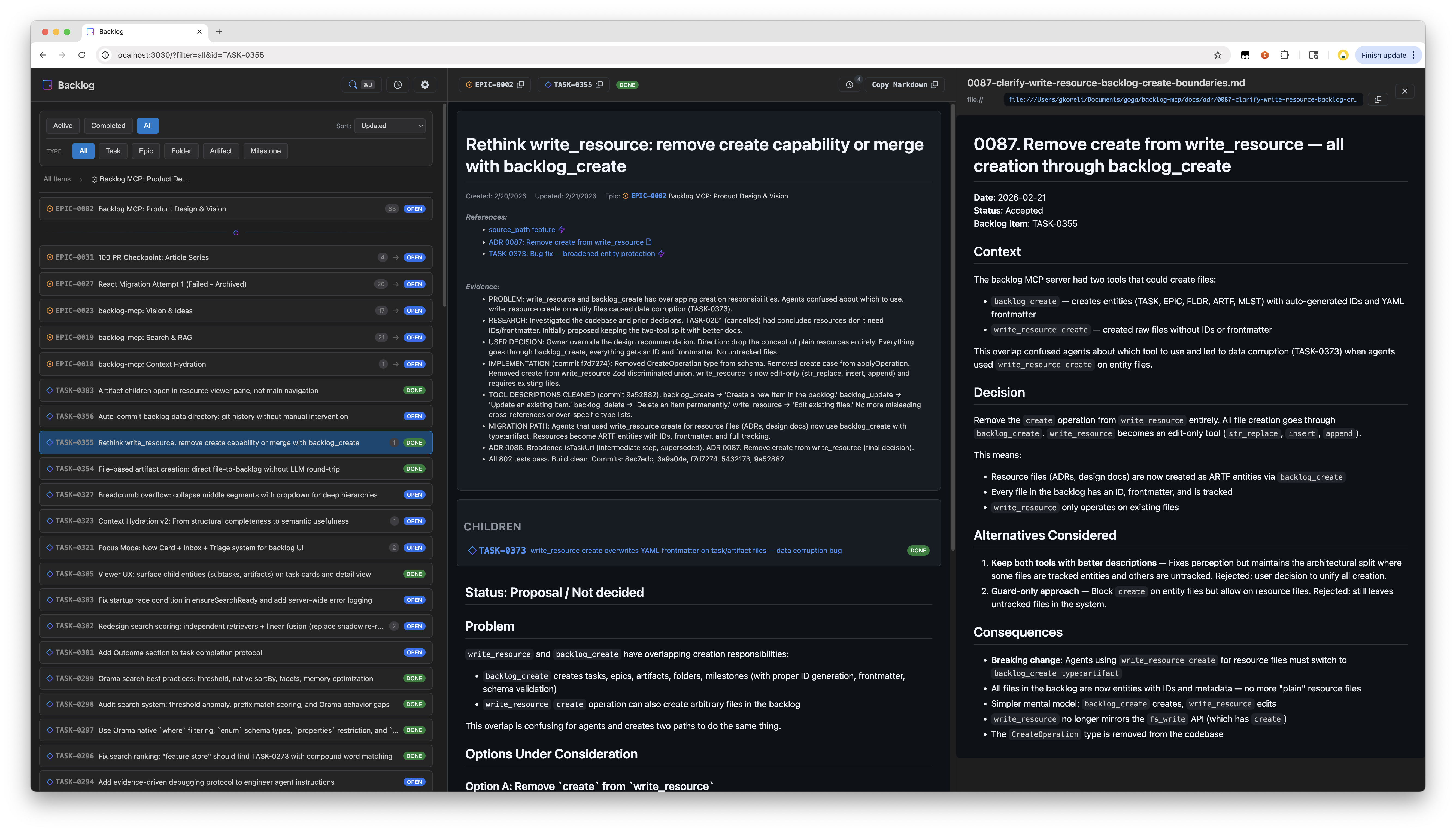
## Web Viewer
Open `http://localhost:3030` — always available when the server is running.
Features:
- Split pane layout with task list and detail view
- Spotlight search with hybrid text + semantic matching
- Real-time updates via SSE
- Activity timeline
- Filter by status, type, epic
- GitHub-style markdown rendering with Mermaid diagrams
- URL state persistence
## Entity Types
5 entity types, all stored as markdown files with YAML frontmatter:
| Type | Prefix | Purpose |
|------|--------|---------|
| Task | `TASK-0001` | Work items |
| Epic | `EPIC-0001` | Groups of related tasks |
| Folder | `FLDR-0001` | Organizational containers |
| Artifact | `ARTF-0001` | Attached outputs (research, designs, logs) |
| Milestone | `MLST-0001` | Time-bound targets with due dates |
**Status values:** `open`, `in_progress`, `blocked`, `done`, `cancelled`
Example task file:
```markdown
---
id: TASK-0001
title: Fix authentication flow
status: open
epic_id: EPIC-0002
parent_id: FLDR-0001
references:
- url: https://github.com/org/repo/issues/123
title: Related issue
evidence:
- Fixed in PR #45
---
The authentication flow has an issue where...
```
## MCP Tools
### backlog_list
```
backlog_list # Active tasks (open, in_progress, blocked)
backlog_list status=["done"] # Completed tasks
backlog_list type="epic" # Only epics
backlog_list epic_id="EPIC-0002" # Tasks in an epic
backlog_list parent_id="FLDR-0001" # Items in a folder
backlog_list query="authentication" # Search across all fields
backlog_list counts=true # Include counts by status/type
backlog_list limit=50 # Limit results
```
### backlog_get
```
backlog_get id="TASK-0001" # Single item
backlog_get id=["TASK-0001","EPIC-0002"] # Batch get
```
### backlog_create
```
backlog_create title="Fix bug"
backlog_create title="Fix bug" description="Details..." epic_id="EPIC-0002"
backlog_create title="Q1 Goals" type="epic"
backlog_create title="Research notes" type="artifact" parent_id="TASK-0001"
backlog_create title="v2.0 Release" type="milestone" due_date="2026-03-01"
backlog_create title="Fix bug" source_path="/path/to/spec.md" # Read description from file
```
### backlog_update
```
backlog_update id="TASK-0001" status="done"
backlog_update id="TASK-0001" status="blocked" blocked_reason=["Waiting on API"]
backlog_update id="TASK-0001" evidence=["Fixed in PR #45"]
backlog_update id="TASK-0001" parent_id="FLDR-0001"
backlog_update id="MLST-0001" due_date="2026-04-01"
```
### backlog_delete
```
backlog_delete id="TASK-0001" # Permanent delete
```
### backlog_search
Full-text + semantic hybrid search with relevance scoring:
```
backlog_search query="authentication bug"
backlog_search query="design decisions" types=["artifact"]
backlog_search query="blocked tasks" status=["blocked"] limit=10
backlog_search query="framework" sort="recent"
backlog_search query="search ranking" include_content=true
```
### backlog_context
Get rich context for a task — parent epic, siblings, children, cross-references, reverse references, recent activity, and semantically related items:
```
backlog_context task_id="TASK-0001"
backlog_context task_id="TASK-0001" depth=2 # Grandparent/grandchildren
backlog_context query="search ranking improvements" # Find by description
backlog_context task_id="TASK-0001" include_related=false # Skip semantic search
```
### write_resource
Edit task content or create standalone resource files:
```
# Edit task body (use str_replace, not create — protects frontmatter)
write_resource uri="mcp://backlog/tasks/TASK-0001.md" \
operation={type: "str_replace", old_str: "old text", new_str: "new text"}
# Create standalone resource
write_resource uri="mcp://backlog/resources/notes.md" \
operation={type: "create", file_text: "# Notes\n\nContent here"}
# Append to resource
write_resource uri="mcp://backlog/resources/log.md" \
operation={type: "append", new_str: "New entry"}
```
## How It Works
Running `npx -y backlog-mcp` (the default MCP config) does the following:
1. **Starts a persistent HTTP server** as a detached background process — serves both the MCP endpoint (`/mcp`) and the web viewer (`/`) on port 3030
2. **Bridges stdio to it** — your MCP client communicates via stdio, which gets forwarded to the HTTP server via `mcp-remote`
3. **Auto-updates**: `npx -y` always pulls the latest published version. If the running server is an older version, it's automatically shut down and restarted with the new one
4. **Resilient recovery**: If the bridge loses connection, a supervisor restarts it with exponential backoff (up to 10 retries). Connection errors like `ECONNREFUSED` are detected and handled automatically
The HTTP server persists across agent sessions — multiple MCP clients can share it. The web viewer is always available at `http://localhost:3030`.
## CLI
All commands via npx:
```bash
npx backlog-mcp # Start stdio bridge + auto-spawn HTTP server (default)
npx backlog-mcp status # Check server status
npx backlog-mcp stop # Stop the server
npx backlog-mcp version # Show version
npx backlog-mcp serve # Run HTTP server in foreground (optional, see below)
```
Sample outputs:
```
$ npx backlog-mcp status
Server is running on port 3030
Version: 0.44.0
Data directory: /Users/you/.backlog
Task count: 451
Uptime: 3515s
Viewer: http://localhost:3030/
MCP endpoint: http://localhost:3030/mcp
$ npx backlog-mcp stop
Stopping server on port 3030...
Server stopped
$ npx backlog-mcp status
Server is not running
```
The CLI exists for humans to inspect and manage the background server that agents use. Since the default mode spawns a detached process, you need `status` to check it and `stop` to shut it down.
`serve` runs the HTTP server in the foreground instead of detached — useful for debugging, Docker containers, or running without an MCP client. In normal usage you never need it; the default command handles everything.
## Configuration
```bash
BACKLOG_DATA_DIR=~/.backlog # Where to store tasks (default: data/tasks/)
BACKLOG_VIEWER_PORT=3030 # HTTP server port
```
Create a `.env` file for local development — see `.env.example`.
## Development
```bash
git clone https://github.com/gkoreli/backlog-mcp.git
cd backlog-mcp
pnpm install
pnpm build # Build all packages
pnpm test # Run all tests (802 across 3 packages)
pnpm dev # Server + viewer with hot reload
```
## Architecture
```
packages/
├── server/ # MCP server, search, context hydration, storage
├── framework/ # @nisli/core — signals, templates, DI, lifecycle
├── viewer/ # 18 web components built on the framework
└── shared/ # Entity types, ID utilities
docs/
├── adr/ # 91 architecture decision records
└── framework-adr/ # 19 framework-specific ADRs
```
110 ADRs document every significant design decision. See [docs/adr/README.md](docs/adr/README.md) for the full index.
## License
MIT
<a href="https://glama.ai/mcp/servers/@gkoreli/backlog-mcp">
<img width="380" height="200" src="https://glama.ai/mcp/servers/@gkoreli/backlog-mcp/badge" alt="backlog-mcp MCP server" />
</a>

