
A
licenseA
qualityF
maintenanceA Model Context Protocol server that enables running AppleScript code to interact with Mac applications and system features including Notes, Calendar, Contacts, Messages, file management, and more.
1
142 npm
465
MIT

Provides access to macOS Siri Shortcuts functionality, allowing listing, opening, and running shortcuts from the macOS Shortcuts app.
Click on "Deploy Server".
Wait a few minutes for the server to deploy. Once ready, it will show a "Started" state.
In the chat, type @ followed by the MCP server name and your instructions, e.g., "@Siri Shortcuts MCP Server run my 'Good Morning' shortcut"
That's it! The server will respond to your query, and you can continue using it as needed.
Here is a step-by-step guide with screenshots.
This MCP server provides access to Siri shortcuts functionality via the Model Context Protocol (MCP). It allows listing, opening, and running shortcuts from the macOS Shortcuts app.
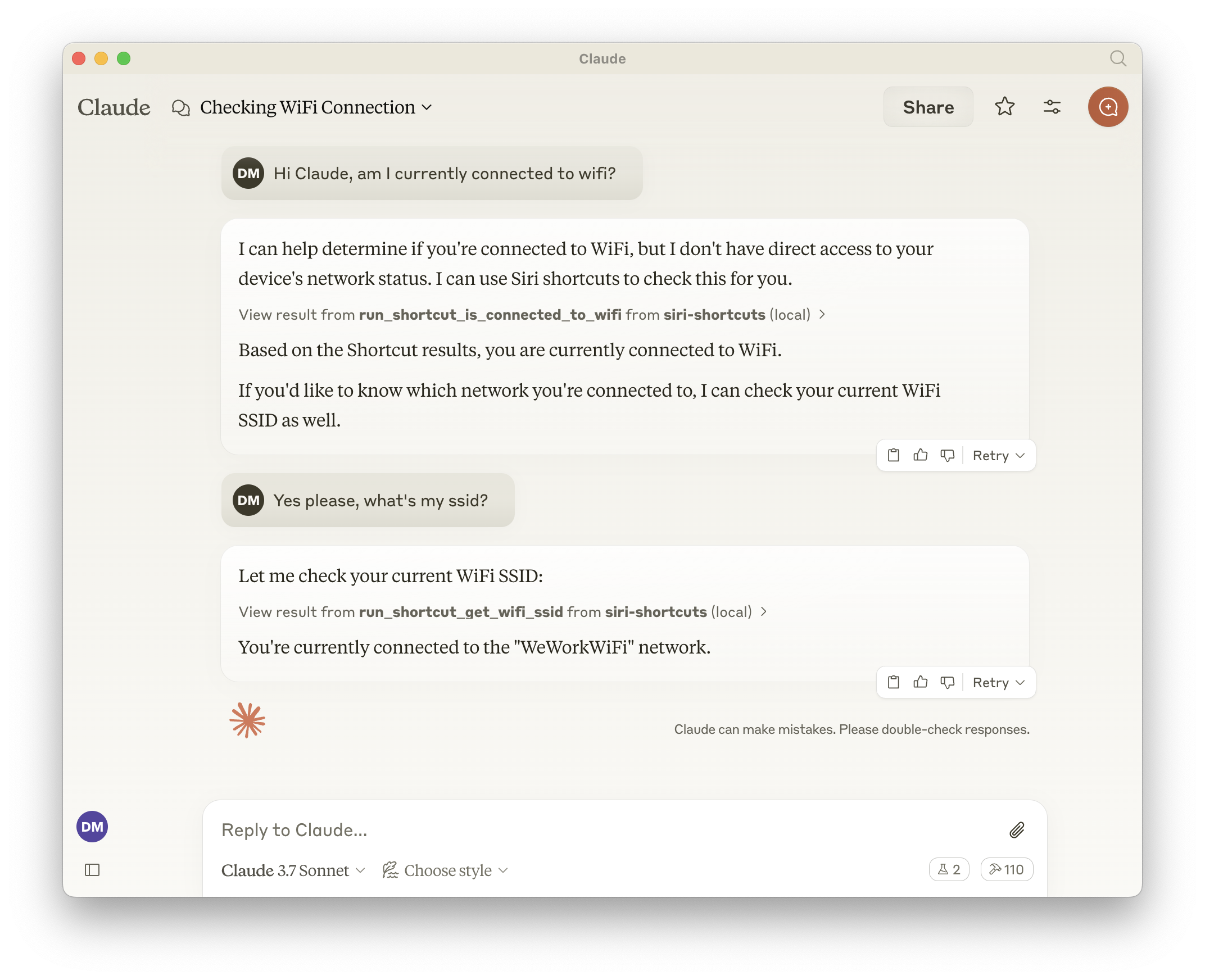
Exposes all shortcuts, meaning the LLM can call anything that is available in the Shortcuts app.
List all available shortcuts
Open shortcuts in the Shortcuts app
Run shortcuts with optional input parameters
Dynamically generated tools for each available shortcut
Related MCP server: macOS Automator MCP Server
list_shortcuts
Lists all available Siri shortcuts on the system
No input required
Returns: Array of shortcut names
{
  "shortcuts": [{ "name": "My Shortcut 1" }, { "name": "My Shortcut 2" }]
}
open_shortcut
Opens a shortcut in the Shortcuts app
Input:
name (string): Name of the shortcut to open
run_shortcut
Runs a shortcut with optional input
Input:
name (string): Name or identifier (UUID) of the shortcut to run
input (string, optional): Text input or filepath to pass to the shortcut
The server automatically generates additional tools for each available shortcut in the format:
Tool name: run_shortcut_[sanitized_shortcut_name]
Description: Runs the specific shortcut
Input:
input (string, optional): Text input or filepath to pass to the shortcut
The server supports the following environment variables:
GENERATE_SHORTCUT_TOOLS (default: true): When set to false, disables the generation of dynamic shortcut tools. Only the base tools (list_shortcuts, open_shortcut, run_shortcut) will be available.
INJECT_SHORTCUT_LIST (default: false): When set to true, injects the list of available shortcuts into the run_shortcut tool description to help the LLM understand which shortcuts are available.
Add to your Claude configuration:
{
  "mcpServers": {
    "siri-shortcuts": {
      "command": "npx",
      "args": ["mcp-server-siri-shortcuts"],
      "env": {
        "GENERATE_SHORTCUT_TOOLS": "true",
        "INJECT_SHORTCUT_LIST": "false"
      }
    }
  }
}Uses the macOS shortcuts CLI command under the hood
Sanitizes shortcut names for tool naming compatibility
Supports both direct text input and file-based input
Returns shortcut output when available
Implements standard MCP error handling
List all available Siri shortcuts
| Name | Required | Description | Default |
|---|---|---|---|
No parameters | |||
Does the description disclose side effects, auth requirements, rate limits, or destructive behavior?
With no annotations provided, the description carries full burden for behavioral disclosure. It states the action 'List all available Siri shortcuts' but doesn't describe what 'available' means, whether it requires permissions, how results are returned, or any rate limits. For a tool with zero annotation coverage, this leaves significant behavioral gaps.
Agents need to know what a tool does to the world before calling it. Descriptions should go beyond structured annotations to explain consequences.
Is the description appropriately sized, front-loaded, and free of redundancy?
The description is a single, efficient sentence with zero waste: 'List all available Siri shortcuts.' It's front-loaded with the core action and resource, making it immediately understandable. No extraneous information or structural issues are present.
Shorter descriptions cost fewer tokens and are easier for agents to parse. Every sentence should earn its place.
Given the tool's complexity, does the description cover enough for an agent to succeed on first attempt?
Given the tool's simplicity (0 parameters, no output schema, no annotations), the description is incomplete. It doesn't explain what 'available' means, how results are structured, or any behavioral constraints. For a listing tool with no structured support, more context about output format or scope would be needed for adequate completeness.
Complex tools with many parameters or behaviors need more documentation. Simple tools need less. This dimension scales expectations accordingly.
Does the description clarify parameter syntax, constraints, interactions, or defaults beyond what the schema provides?
The tool has 0 parameters with 100% schema description coverage, so the schema fully documents the absence of inputs. The description doesn't need to compensate for parameter documentation, and it appropriately doesn't mention parameters. Baseline for 0 parameters is 4, as it avoids unnecessary parameter discussion.
Input schemas describe structure but not intent. Descriptions should explain non-obvious parameter relationships and valid value ranges.
Does the description clearly state what the tool does and how it differs from similar tools?
The description clearly states the verb 'List' and the resource 'Siri shortcuts' with the qualifier 'all available', making the purpose unambiguous. It distinguishes from siblings open_shortcut and run_shortcut by focusing on listing rather than execution. However, it doesn't specify output format or scope beyond 'available', leaving minor room for improvement.
Agents choose between tools based on descriptions. A clear purpose with a specific verb and resource helps agents select the right tool.
Does the description explain when to use this tool, when not to, or what alternatives exist?
No explicit guidance is provided on when to use this tool versus alternatives like open_shortcut or run_shortcut. The description implies it's for listing shortcuts, but doesn't clarify prerequisites, context, or exclusions. Usage is implied rather than explicitly stated, which could lead to confusion in tool selection.
Agents often have multiple tools that could apply. Explicit usage guidance like "use X instead of Y when Z" prevents misuse.
Open a shortcut in the Shortcuts app
| Name | Required | Description | Default |
|---|---|---|---|
| name | Yes | The name of the shortcut to open |
Does the description disclose side effects, auth requirements, rate limits, or destructive behavior?
With no annotations provided, the description carries full burden for behavioral disclosure but offers minimal information. It states the action but doesn't explain what 'opening' entails (does it launch the app? display details? require specific permissions?), whether it's read-only or has side effects, or what happens if the shortcut doesn't exist.
Agents need to know what a tool does to the world before calling it. Descriptions should go beyond structured annotations to explain consequences.
Is the description appropriately sized, front-loaded, and free of redundancy?
The description is extremely concise - a single sentence that directly states the tool's purpose with zero wasted words. It's front-loaded and efficiently communicates the core functionality without unnecessary elaboration.
Shorter descriptions cost fewer tokens and are easier for agents to parse. Every sentence should earn its place.
Given the tool's complexity, does the description cover enough for an agent to succeed on first attempt?
For a tool with no annotations, no output schema, and sibling tools that perform related but distinct operations, the description is insufficiently complete. It doesn't explain what 'opening' means operationally, how it differs from 'running', what the expected outcome is, or address potential error conditions.
Complex tools with many parameters or behaviors need more documentation. Simple tools need less. This dimension scales expectations accordingly.
Does the description clarify parameter syntax, constraints, interactions, or defaults beyond what the schema provides?
The schema description coverage is 100%, with the single parameter 'name' clearly documented in the schema. The description doesn't add any parameter-specific information beyond what's already in the structured data, so it meets the baseline for high schema coverage without compensating value.
Input schemas describe structure but not intent. Descriptions should explain non-obvious parameter relationships and valid value ranges.
Does the description clearly state what the tool does and how it differs from similar tools?
The description clearly states the action ('Open') and target resource ('a shortcut in the Shortcuts app'), making the purpose immediately understandable. However, it doesn't explicitly differentiate from sibling tools like 'run_shortcut' - both involve interacting with shortcuts but serve different purposes.
Agents choose between tools based on descriptions. A clear purpose with a specific verb and resource helps agents select the right tool.
Does the description explain when to use this tool, when not to, or what alternatives exist?
The description provides no guidance on when to use this tool versus alternatives like 'run_shortcut' or 'list_shortcuts'. There's no mention of prerequisites, appropriate contexts, or what distinguishes 'opening' from 'running' a shortcut, leaving the agent with insufficient usage context.
Agents often have multiple tools that could apply. Explicit usage guidance like "use X instead of Y when Z" prevents misuse.
Run a shortcut by name or identifier (UUID) with optional input and output parameters
| Name | Required | Description | Default |
|---|---|---|---|
| input | No | The input to pass to the shortcut. Can be text, or a filepath | |
| name | Yes | The name or identifier (UUID) of the shortcut to run |
Does the description disclose side effects, auth requirements, rate limits, or destructive behavior?
With no annotations provided, the description carries full burden but offers minimal behavioral insight. It mentions 'optional input and output parameters' but doesn't clarify execution effects (e.g., whether it's read-only, requires permissions, has side effects, or handles errors). This is inadequate for a tool that likely performs actions.
Agents need to know what a tool does to the world before calling it. Descriptions should go beyond structured annotations to explain consequences.
Is the description appropriately sized, front-loaded, and free of redundancy?
The description is a single, efficient sentence that front-loads the core action and key details. Every word earns its place with no redundancy, making it highly concise and well-structured for quick understanding.
Shorter descriptions cost fewer tokens and are easier for agents to parse. Every sentence should earn its place.
Given the tool's complexity, does the description cover enough for an agent to succeed on first attempt?
Given no annotations, no output schema, and a tool that performs an action ('run'), the description is incomplete. It lacks details on execution behavior, return values, error handling, or security implications, which are critical for an agent to use it correctly in context.
Complex tools with many parameters or behaviors need more documentation. Simple tools need less. This dimension scales expectations accordingly.
Does the description clarify parameter syntax, constraints, interactions, or defaults beyond what the schema provides?
Schema description coverage is 100%, so the schema fully documents both parameters. The description adds no additional meaning beyond implying 'name' can be an identifier and 'input' is optional, which is already covered in the schema. Baseline 3 is appropriate as the schema does the heavy lifting.
Input schemas describe structure but not intent. Descriptions should explain non-obvious parameter relationships and valid value ranges.
Does the description clearly state what the tool does and how it differs from similar tools?
The description clearly states the action ('run') and resource ('shortcut'), specifying it can be executed by name or UUID. It distinguishes from siblings like 'list_shortcuts' (listing) and 'open_shortcut' (opening), though it doesn't explicitly contrast them. The purpose is specific but lacks explicit sibling differentiation.
Agents choose between tools based on descriptions. A clear purpose with a specific verb and resource helps agents select the right tool.
Does the description explain when to use this tool, when not to, or what alternatives exist?
No guidance is provided on when to use this tool versus alternatives like 'list_shortcuts' or 'open_shortcut'. The description mentions optional input and output parameters but doesn't explain contexts or prerequisites for usage, leaving the agent to infer from tool names alone.
Agents often have multiple tools that could apply. Explicit usage guidance like "use X instead of Y when Z" prevents misuse.
Recent tool additions, removals, and schema changes observed during successful MCP inspections.
v1.0.0list_shortcutsopen_shortcutrun_shortcutScored across 3 tools
Each tool has a clearly distinct purpose: listing shortcuts, opening them in the app, and running them with parameters. There is no overlap in functionality, making it easy for an agent to select the correct tool.
All tool names follow a consistent verb_noun pattern (list_shortcuts, open_shortcut, run_shortcut) with no deviations in style or convention, providing predictable and readable naming.
With only 3 tools, the set feels thin for a Siri Shortcuts server, as it lacks operations like creating, editing, or deleting shortcuts, which are core to managing shortcuts. However, the tools cover basic viewing and execution.
The tool surface is significantly incomplete for a Siri Shortcuts domain, missing essential CRUD operations (e.g., create_shortcut, update_shortcut, delete_shortcut) and other management features, which will limit agent capabilities in handling shortcuts comprehensively.
MCP connector that lets ChatGPT list, search, and run your Apple Shortcuts via a local Mac agent
Search, read, and write your Apple Notes from ChatGPT/Claude via a local Mac agent + MCP relay.
Enable secure connectivity between Sentry issues and debugging data, and LLM clients, using a Model Context Protocol (MCP) server.
A comprehensive Model Context Protocol (MCP) server that enables AI assistants to interact with yo…