
Click on "Install Server".
Wait a few minutes for the server to deploy. Once ready, it will show a "Started" state.
In the chat, type
@followed by the MCP server name and your instructions, e.g., "@Tableau MCP Servershow me the top 10 products by sales from the Superstore datasource"
That's it! The server will respond to your query, and you can continue using it as needed.
Here is a step-by-step guide with screenshots.
Tableau MCP


Overview
Tableau MCP is a suite of developer primitives, including tools, resources and prompts, that will make it easier for developers to build AI applications that integrate with Tableau.
Official Documentation
https://tableau.github.io/tableau-mcp/
Quick Start
Requirements
Node.js 22.7.5 or newer
An MCP client e.g. Claude Desktop, Cursor, VS Code, MCP Inspector, etc.
Standard config works in most MCP clients:
{
  "mcpServers": {
    "tableau": {
      "command": "npx",
      "args": ["-y", "@tableau/mcp-server@latest"],
      "env": {
        "SERVER": "https://my-tableau-server.com",
        "SITE_NAME": "my_site",
        "PAT_NAME": "my_pat",
        "PAT_VALUE": "pat_value"
      }
    }
  }
}
Deploy to Heroku

Example Prompts to Client
Prompt #1: Querying Data
For the Superstore Datasource, what are the top 5 states with the most sales in 2025?Response
Based on the Superstore Datasource, here are the top 5 states with the most sales in 2025:
  1. California - $146,388.34
  2. New York - $93,922.99
  3. Washington - $65,539.90
  4. Texas - $43,421.76
  5. Pennsylvania - $42,688.31
California leads by a significant margin with over $146,000 in sales, followed by New York with nearly $94,000. These two states alone account for a substantial portion of the total sales across the top 5 states.
Prompt #2: Content Exploration
Find me the most viewed workbook within the last year.Response
The most viewed workbook within the last year is:

Global Connections
- Owner: John Doe
- Project: Marketing
- Views in last year: 523
- Last Modified: September 2, 2025
- Workbook ID: 111fb672-9401-4913-a167-17b3d89a3e4f
Prompt #3: Getting a View
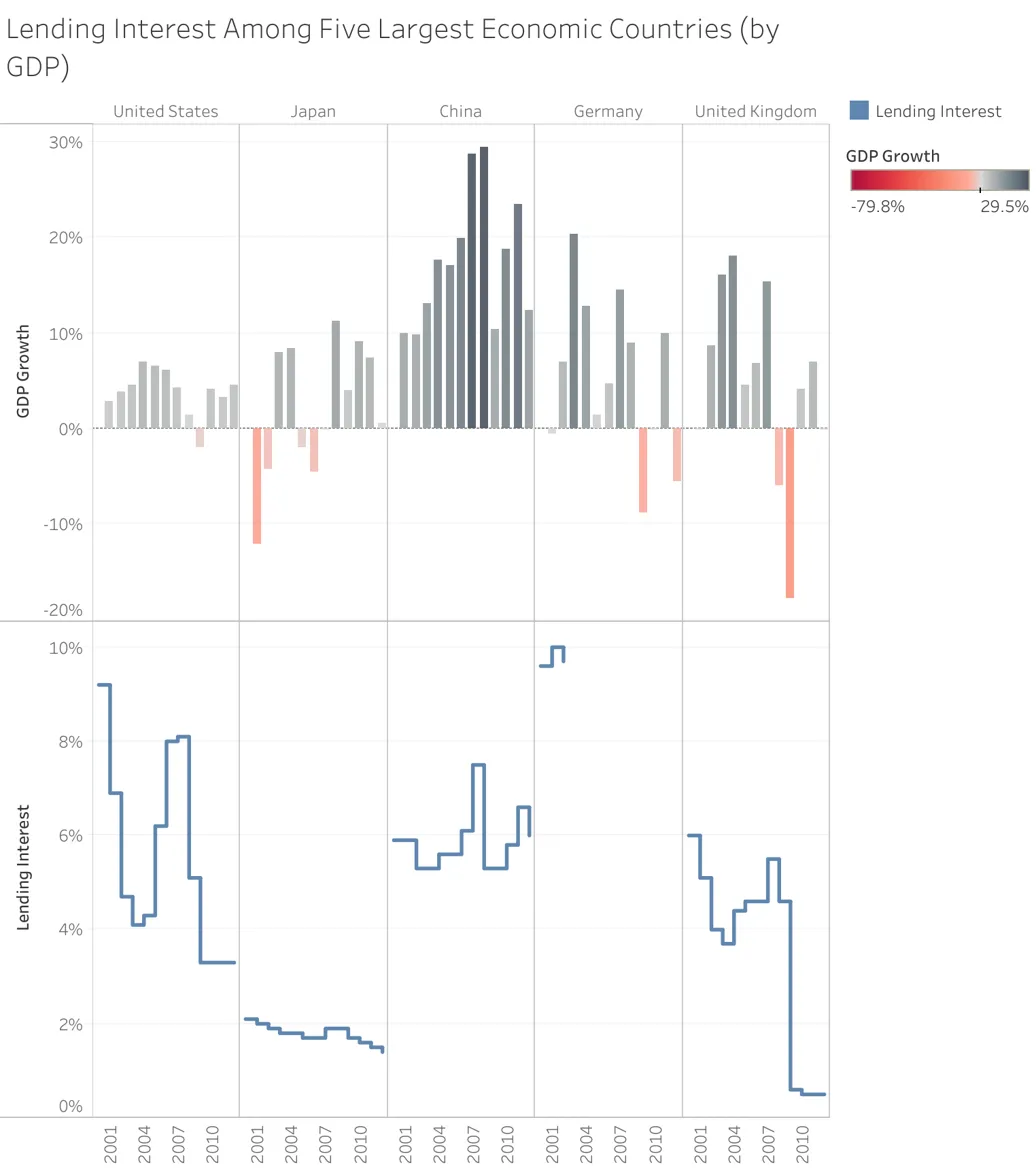
Show me an image of the "Economy" view in the "Finances" project.Response

This server cannot be installed
Resources
Unclaimed servers have limited discoverability.
Looking for Admin?
If you are the server author, to access and configure the admin panel.