
The Aidderall MCP Server is a hierarchical task management tool that gives AI assistants a structured way to organize, track, and navigate complex multi-step work with persistent context.
Task Creation
create_new_task– Create an independent top-level task for unrelated work or parallel workstreamsextend_current_task– Add a subtask under the current task to decompose complex work hierarchically
Navigation & Context
get_current_task– Retrieve the currently active/focused taskswitch_focus– Jump to any task by ID, enabling free navigation across the workspacepeek_context– Inspect the parent task and previous sibling without changing focuslist_siblings– List all sibling tasks to understand position in a sequenceget_big_picture– View the entire task hierarchy (including completed tasks) as a living documentget_stack_overview– Get a full JSON structure of all tasks and their relationships
Task Management
complete_current_task– Mark the current task as completed; it remains visible and focus shifts automaticallyupdate_current_task– Modify the notes/body content of the currently focused taskremove_task– Remove any task (and its subtasks) from the active workspaceget_completed_tasks– View a chronological archive of all completed tasks
Session Management
list_sessions– List all persisted sessions with metadataresume_session– Resume a previous session's full task statedelete_session– Delete a stale session
All task state is automatically saved to SQLite on every change, surviving server restarts and crashes.
Click on "Install Server".
Wait a few minutes for the server to deploy. Once ready, it will show a "Started" state.
In the chat, type
@followed by the MCP server name and your instructions, e.g., "@Aidderall MCP Servercreate a main task for implementing user authentication with subtasks for database, API, and UI"
That's it! The server will respond to your query, and you can continue using it as needed.
Here is a step-by-step guide with screenshots.

Welcome to Aidderall MCP Server!
Aidderal is a Model Context Protocol (MCP) server implementation for hierarchical task management, providing AI assistants with a cognitive prosthetic for maintaining focus and context across complex problem-solving sessions.
AI assistants have a hard time dealing with long running tasks, in part due to limitations in the amount of information they can handle at any one point in time (context window).
Aidderall solves this issue by giving the AI assistant:
Focus
A map of the current cognitive landscape with context
Think of aidderall as many small context windows which help the AI focus and remember!
Overview
Aidderall implements a flexible hierarchical task management system where:
Tasks can be organized in nested structures for complex work decomposition
Create independent tasks for parallel work streams
Navigate freely between any tasks using switch_focus
Complete tasks in any order that makes sense for your workflow
All tasks remain visible as a living document of your work
Related MCP server: MCP Think Tank
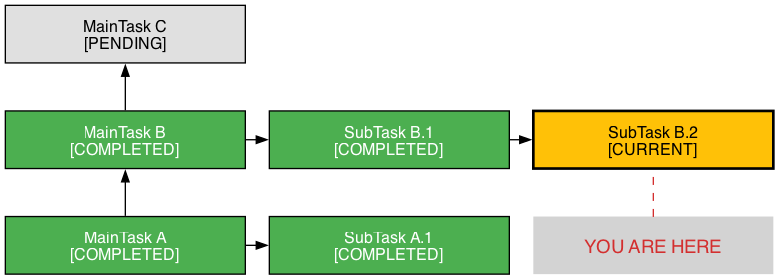
What does Aidderall look like?
Features
Hierarchical Task Management: Create main tasks and extend them with subtasks
Focus Enforcement: Only one task can be active at a time
Context Preservation: Maintain breadcrumb trails and sibling awareness
Task Completion: Archive completed tasks with timestamps
Session Persistence: Task state is automatically persisted to SQLite on every mutation — survives server restarts, crashes, and context compaction
Session Management: Each server instance gets a unique session. List, resume, or clean up previous sessions
Acknowledgements
Thanks to Alberto for coming up with the name... the project name was not so exciting before! 😀
Installation
Clone the repository:
Create and activate a virtual environment:
Install dependencies:
For development, install with dev dependencies:
Usage
Running the Server
Start the MCP server:
The server runs via the Python module directly.
Integrating with AI Assistants
For Claude Code
If you have Claude Code installed, you can add Aidderall directly:
Manual Configuration
Alternatively, add the server to your MCP configuration:
Available Commands
Task Creation
create_new_task(title, body)- Create a new independent task for unrelated work or new topicsextend_current_task(title, body)- Add a subtask to organize and break down the current task
Navigation & Information
get_current_task()- Returns current task with contextget_big_picture(format='text')- Shows entire task hierarchy (format: 'text' or 'json')get_stack_overview()- Returns JSON structure of systempeek_context(include_body=False)- View parent and sibling contextlist_siblings(include_body=False)- List tasks at current level
Task Management
complete_current_task()- Mark current task as complete (stays visible)update_current_task(body)- Update current task bodyswitch_focus(task_id)- Switch focus to any task by IDremove_task(task_id)- Remove task from structure (preserves in history)get_completed_tasks(order)- View completed task archive
Session Management
list_sessions()- List all persisted sessions with metadata (task count, current task, last modified)resume_session(session_id)- Resume a previous session's task state (empty sessions are auto-cleaned on resume)delete_session(session_id)- Delete a stale session (cannot delete the active session)
Example Workflow
Development
Running Tests
Code Coverage
Code Formatting
Type Checking
Persistence
Task state is automatically persisted to SQLite at ~/.aidderall/sessions/<session_id>/state.db. Each server instance generates a unique session ID, so concurrent sessions never interfere with each other.
Auto-save: Every mutation (create, extend, complete, update, switch, remove) writes to disk immediately
Auto-restore: Resuming a session loads the full task hierarchy, completed archive, and focus state
Auto-cleanup: Empty sessions are deleted when you resume a different session
Architecture
models.py- Core data structures (Task, MainTask, SubTask) with serializationtask_manager.py- Task management logic and state handlinghandlers.py- MCP command implementationspersistence.py- SQLite-backed session persistenceserver.py- MCP server entry point
Documentation
Usage Guide - Comprehensive guide for getting AI assistants to use Aidderall effectively
Technical Specification - Detailed technical specification of the hybrid stack-list model
AI Assistant Evolution - Vision for transforming AI from stateless oracle to focused worker
Work Log - Development history and architectural decisions
Contributing
Fork the repository
Create a feature branch
Add tests for new functionality
Ensure all tests pass
Submit a pull request
License
This project is licensed under the GNU General Public License v3.0 or later - see the LICENSE file for details.
Copyright (C) 2024 Briam R. briamr@gmail.com
