
The MCP Creator Growth server is a learning companion and debugging assistant for AI coding tools that helps developers understand AI-generated code while providing persistent, project-specific debugging memory.
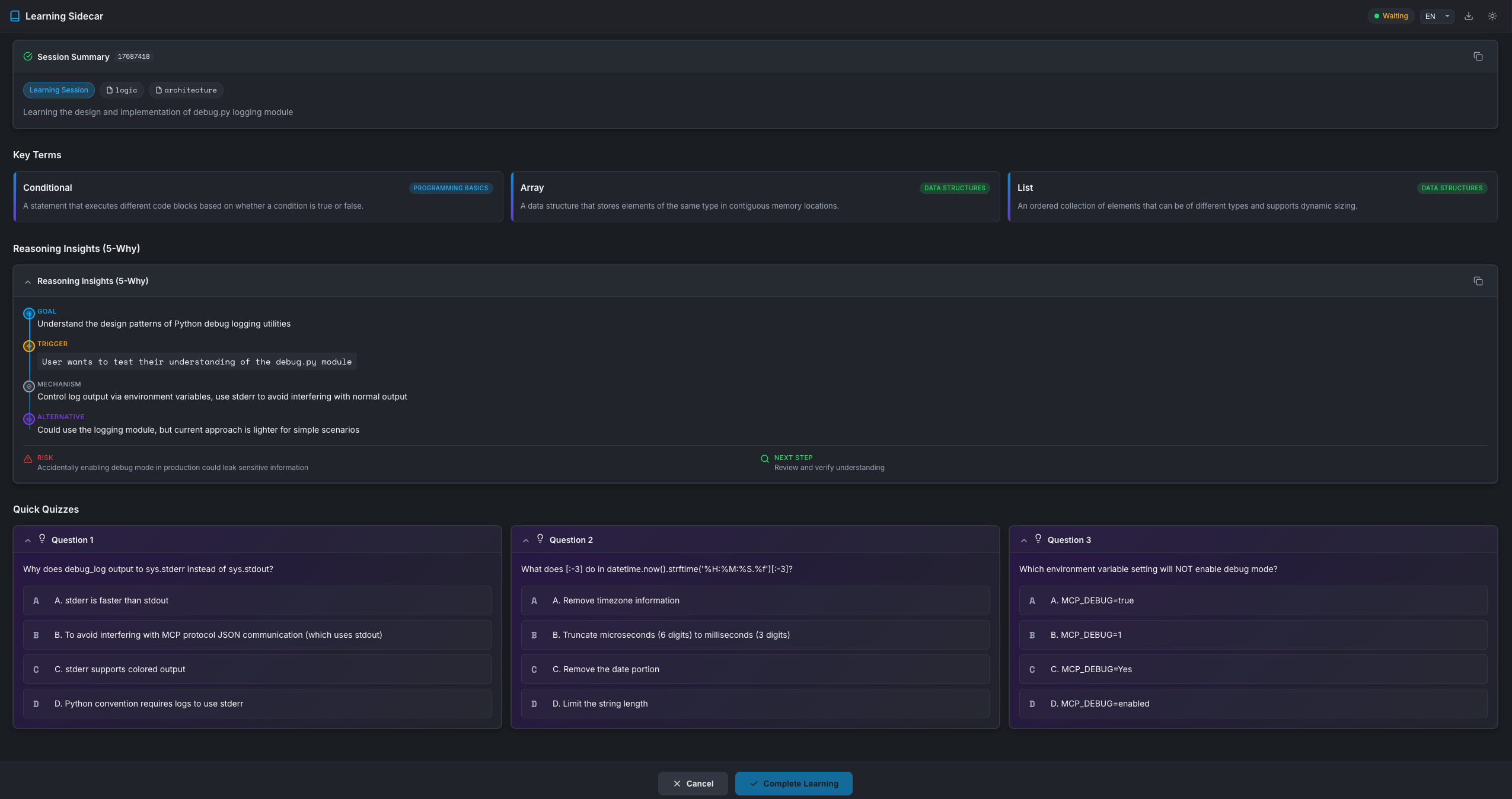
Interactive Learning Sessions: Create quizzes based on recent code changes to test understanding of logic, security, performance, architecture, or syntax. The server blocks AI execution until the developer completes the quiz via WebUI, ensuring active learning with structured 5-Why analysis reasoning.
Smart Debugging Memory: Automatically search past debugging solutions when errors occur using silent RAG (Retrieval-Augmented Generation). After fixes, the server automatically records debugging experiences—including error type, context, root cause, and solution—building a project-specific knowledge base that prevents redundant problem-solving.
Programming Term Reference: Fetch definitions for programming terms from various domains (basics, algorithms, data structures, web dev, etc.) while tracking shown terms to avoid repetition.
Project-Specific Memory: Maintains persistent knowledge bases in each project's .mcp-sidecar/ directory, enabling cross-session learning with separate databases per project.
Privacy & Local Control: All data is stored locally with no external telemetry. Users have full control—simply delete .mcp-sidecar/ to reset. Works with Claude Code, Cursor, Windsurf, and other MCP-compatible IDEs.
Automatic Tool Triggers: Debug tools (debug_search and debug_record) work silently in the background, while learning sessions require explicit user requests.
Click on "Install Server".
Wait a few minutes for the server to deploy. Once ready, it will show a "Started" state.
In the chat, type
@followed by the MCP server name and your instructions, e.g., "@MCP Creator GrowthQuiz me on the changes you just made to ensure I understand the logic."
That's it! The server will respond to your query, and you can continue using it as needed.
Here is a step-by-step guide with screenshots.
MCP Creator Growth
A context-aware Model Context Protocol (MCP) server that acts as a learning sidecar for AI coding assistants. It helps developers learn from AI-generated code changes through interactive quizzes and provides agents with a persistent project-specific debugging memory.


🌐 Resources
Resource | Description |
Official MCP server listing with installation guides | |
AI-generated deep analysis of the codebase | |
Source code, issues, and contributions |
🚀 Why Use This?
For | Benefit |
Developers | Don't just accept AI code—understand it. Request a quiz to verify your grasp of the logic, security, or performance implications. |
AI Agents | Stop solving the same bug twice. The server quietly records debugging solutions and retrieves them automatically when similar errors occur. |
📦 Available Tools
Tool | Type | Description |
| 🎓 Interactive | Opens a WebUI quiz based on recent code changes. Blocks until user completes learning. |
| 🔍 Silent RAG | Searches project debug history for relevant past solutions. Auto-triggered on errors. |
| 📝 Silent | Records debugging experiences to project knowledge base. Auto-triggered after fixes. |
| 📚 Reference | Fetches programming terms/concepts. Tracks shown terms to avoid repetition. |
Tool Details
Trigger: User explicitly requests (e.g., "Quiz me", "Test my understanding")
Parameters:
Parameter | Type | Default | Description |
| string |
| Project directory path |
| string | — | Structured summary of Agent's actions |
| object | null | 5-Why reasoning (goal, trigger, mechanism, alternatives, risks) |
| array | auto-generated | 3 quiz questions with options, answer, explanation |
| array |
| Focus areas: logic, security, performance, architecture, syntax |
| int | 600 | Timeout in seconds (60-7200) |
Returns: {"status": "completed", "action": "HALT_GENERATION"}
Trigger: Auto-called when encountering errors (silent, no UI)
Parameters:
Parameter | Type | Default | Description |
| string | — | Error message or description to search |
| string |
| Project directory path |
| string | null | Filter by error type (e.g., ImportError) |
| array | null | Filter by tags |
| int | 5 | Maximum results (1-20) |
Returns: {"results": [...], "count": N}
Trigger: Auto-called after fixing bugs (silent, background)
Parameters:
Parameter | Type | Default | Description |
| object | — | Error context: |
| string | — | Root cause analysis |
| string | — | Solution that worked |
| string |
| Project directory path |
| array | null | Tags for categorization |
Returns: {"ok": true, "id": "..."}
Available Domains: programming_basics, data_structures, algorithms, software_design, web_development, version_control, testing, security, databases, devops
Parameters:
Parameter | Type | Default | Description |
| string |
| Project directory path |
| int | 3 | Number of terms (1-5) |
| string | null | Filter by domain |
Returns: {"terms": [...], "count": N, "remaining": N}
🛠️ Installation
One-Line Install (Recommended)
The installer will:
Auto-detect your Python environment (uv → conda → venv)
Clone the repository to
~/mcp-creator-growthCreate virtual environment and install dependencies
Print the exact command to configure your IDE
Manual Installation
Prerequisites: Python 3.11+ or uv
Docker Installation
Prerequisites: Docker installed on your system
For detailed Docker usage, persistent storage, and Claude Desktop integration, see DOCKER.md.
⚙️ IDE Configuration
Claude Code (CLI) — One Command Setup
After installation, configure your AI coding IDE to use this MCP server.
Claude Code
Option 1: CLI (Recommended)
Option 2: Config File
Add to ~/.claude.json:
For Windows:
Example paths:
Unix (uv):
~/mcp-creator-growth/mcp-creator-growth/bin/mcp-creator-growthWindows (uv):
C:\\Users\\YourName\\mcp-creator-growth\\mcp-creator-growth\\Scripts\\mcp-creator-growth.exeWindows (conda):
C:\\Users\\YourName\\anaconda3\\envs\\mcp-creator-growth\\Scripts\\mcp-creator-growth.exe
Path breakdown (Unix example):
~/mcp-creator-growth→ repository directorymcp-creator-growth→ virtual environment directory created by uv/venvbin/mcp-creator-growth→ executable
Cursor
Add to Cursor MCP settings (Settings → MCP → Add Server):
For Windows:
Windsurf
Add to ~/.codeium/windsurf/mcp_config.json:
Docker Configuration
To use Docker with any MCP-compatible IDE:
See DOCKER.md for detailed Docker configuration examples for Claude Desktop, Cursor, and other IDEs.
Other IDEs
For any MCP-compatible IDE, use these settings:
Command:
<install-path>/mcp-creator-growth/bin/mcp-creator-growth(ormcp-creator-growth\Scripts\mcp-creator-growth.exeon Windows)Transport: stdio
After configuration, restart your IDE.
Usage
Available Tools
Tool | Trigger | For | Returns |
| User explicit request | User |
|
| Automatic (on error) | Agent | Compact summaries |
| Automatic (after fix) | Agent |
|
For Users: Learning Session
Say to your AI assistant:
"Quiz me on this change"
"Test my understanding"
"Help me learn about what you did"
The agent will create an interactive learning card and wait until you complete it.
Note: Quiz scores are saved locally for your self-tracking but are NOT returned to the agent - this keeps the context clean.
For Agents: Debug Tools
The debug tools work silently in the background:
Search first: When encountering errors, agent searches past solutions
Record after: When fixing errors, agent records the solution
Progressive disclosure: Returns compact summaries, not full records
Fast lookups: Uses inverted index for keyword-based searches
Updating
One-Line Update (Recommended)
The remote update script automatically detects your installation and works with any path format (including Chinese/non-ASCII paths):
The update script will:
Auto-detect your installation location (supports multiple installations)
Pull the latest changes from the repository
Force-reinstall dependencies to ensure version synchronization
Verify installation integrity and report any issues
Detect if MCP server is in use and provide clear instructions
Why remote update?
✅ Works with Chinese/non-ASCII paths without
cdnavigation✅ Always uses the latest update logic from the repository
✅ Auto-detects installation location even if you forgot where it is
✅ Handles multiple installations gracefully
Local Update (Alternative)
macOS / Linux:
Windows (PowerShell):
Manual Update
🖼️ Screenshots
Learning Session WebUI
🔒 Security & Privacy
Aspect | Details |
Local First | All data stored in |
No Telemetry | Zero data sent to external servers |
Full Control | Delete |
🔮 Roadmap
We're building toward a Personalized Learning Center that grows with you. Here's what's coming:
🔍 Advanced Search & Indexing (v1.2)
Feature | Description |
SQLite FTS5 | Full-text search with Chinese support, prefix matching, and boolean queries |
BM25 Ranking | Industry-standard relevance scoring for better search results |
Semantic Search | Vector embeddings for meaning-based matching (e.g., "权限错误" finds "permission denied") |
Cross-project Search | Search debug experiences across all your projects |
📱 Mobile App (v2.0)
Feature | Description |
Learning History Sync | Access your quiz history and learning progress on mobile |
Spaced Repetition | Smart review scheduling based on forgetting curves |
Offline Mode | Learn anywhere, sync when connected |
Push Notifications | Gentle reminders to review concepts you're forgetting |
🎯 Personalized Learning Center (v2.5)
Feature | Description |
Knowledge Graph | Visual map of concepts you've learned and their connections |
Weakness Analysis | AI identifies areas where you struggle and suggests focused practice |
Learning Streaks | Gamification to keep you motivated |
Team Insights | (Optional) Share anonymized learning patterns with your team |
🤖 AI Enhancements (v3.0)
Feature | Description |
Adaptive Quizzes | Questions adjust difficulty based on your performance |
Code Pattern Recognition | Learn from patterns in your own codebase |
Multi-language Support | Explanations in your preferred language |
Voice Interface | "Hey Claude, quiz me on what we did yesterday" |
Want to influence the roadmap? Open an issue or join the discussion!
🔧 Environment Variables
Variable | Default | Description |
|
| Enable debug logging ( |
|
| MCP server startup timeout in ms |
|
| Maximum tokens for MCP output |
🤝 Contributing
We welcome contributions! Please follow these steps:
Fork the repository
Create a feature branch:
git checkout -b feature/amazing-featureInstall dev dependencies:
uv pip install -e '.[dev]'Make changes and run tests:
pytestSubmit a Pull Request
See CONTRIBUTING.md for detailed guidelines.
📬 Contact
Channel | Address |
GitHub Issues |
📄 License
This project is licensed under the MIT License.