
Click on "Install Server".
Wait a few minutes for the server to deploy. Once ready, it will show a "Started" state.
In the chat, type
@followed by the MCP server name and your instructions, e.g., "@Pikud Haoref Alert Systemcheck for any active alerts in Tel Aviv right now"
That's it! The server will respond to your query, and you can continue using it as needed.
Here is a step-by-step guide with screenshots.
Pikud Haoref Real-Time Alert System
A comprehensive middleware service and MCP server for accessing Israeli emergency alerts from the official Pikud Haoref (Israeli Home Front Command) API.
Overview
This project provides two ways to access Israeli emergency alert data using a publish-subscribe architecture:
FastAPI Middleware Service - Single source polling with real-time SSE streaming
MCP Server - Event-driven subscriber for AI assistants (built with FastMCP)
The FastAPI service polls the official Pikud Haoref API at https://www.oref.org.il/WarningMessages/alert/alerts.json and publishes alerts via Server-Sent Events. The MCP server subscribes to this stream, creating an efficient pub-sub system that eliminates duplicate API calls while providing real-time access to emergency alerts including rocket alerts, aerial intrusions, earthquakes, and other emergencies.
Features
FastAPI Service Features
Single-source polling of emergency alerts (eliminates duplicate API calls)
Real-time SSE streaming via public webhook endpoint
API key authentication for client endpoints and geo-restriction to Israel
Docker support for easy deployment
Comprehensive testing suite
MCP Server Features
Event-driven SSE client - Subscribes to FastAPI webhook for real-time alerts
3 Tools for AI assistants:
check_current_alerts- Check for active alerts from subscribed streamget_alert_history- Get recent alerts with filtering (limit: 1-50, region filter, intelligent city matching)get_connection_status- Check SSE subscription connection status
2 Resources:
poha://alerts/recent- JSON data of recent alertspoha://alerts/current-status- System status information
Smart City Filtering:
Exact substring matching - Find alerts by city name (e.g., "תל אביב" matches all Tel Aviv areas)
Fuzzy matching - Intelligent matching with threshold 60 for partial/similar names
Multi-city support - Search multiple cities simultaneously
Hebrew city names - Optimized for Hebrew location names from the API
Built with FastMCP following proven patterns
Automatic reconnection and error handling for SSE connections
Quick Start
Important: The Pikud HaOref API (oref.org.il) geo-blocks non-Israeli IPs. You must run the services on a machine with an Israeli IP — either locally in Israel or on a GCP
me-west1(Tel Aviv) VM.
1. Deploy with Docker (Recommended)
After startup, services are available at:
FastAPI + Swagger UI: http://localhost:8000/docs
MCP Server: http://localhost:8001/mcp
SSE Gateway: http://localhost:8002/api/alerts-stream
2. Configure your MCP client
Add to VS Code mcp.json, Claude Desktop config, or Cursor config:
3. Test alerts
4. Connect to SSE stream
Local Development (without Docker)
API Endpoints (FastAPI Service)
GET /
Basic status endpoint.
GET /api/alerts-stream
Headers: X-API-Key: your-key
Server-Sent Events stream for real-time alerts (authenticated endpoint). Returns:
event: new_alert- When a new alert is detected: keep-alive- Periodic keep-alive messages
GET /api/webhook/alerts
Headers: X-API-Key: your-key
Internal SSE webhook endpoint for services like the MCP server. Streams the same alert data as the client endpoint and requires the same API key authentication for security. Designed for server-to-server communication.
Example response for both endpoints:
MCP Tools Usage
Check Current Alerts
Get Alert History MCP
City Filtering Examples:
cities=["תל אביב"]- Finds all Tel Aviv areas (דרום העיר ויפו, מזרח, מרכז העיר, עבר הירקון)cities=["חיפה"]- Finds all Haifa-related alertscities=["תל אביב", "חיפה", "ירושלים"]- Multiple cities simultaneouslycities=["תל אביב מרכז"]- Fuzzy matches to "תל אביב - מרכז העיר"cities=["all"]- No city filtering (shows all alerts)
Check Connection Status
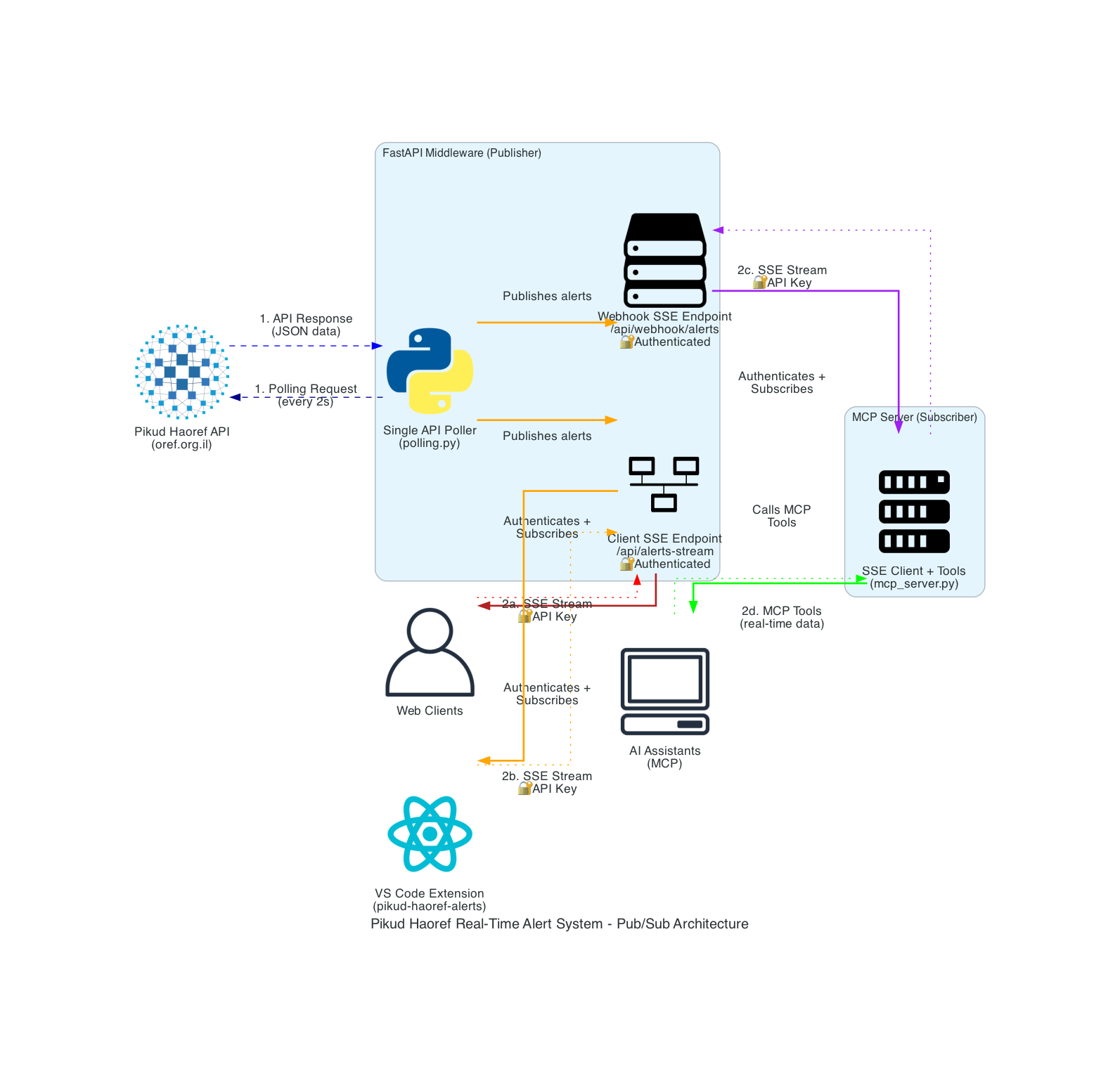
Architecture
The system uses a publish-subscribe architecture with the following components:
Pikud Haoref API - External data source (government emergency alerts)
FastAPI Middleware - Single source polling + SSE publisher (polls every 2 seconds)
MCP Server - SSE subscriber + tool provider for AI assistants
Client Applications - Web frontends, mobile apps, AI assistants, or other services
Key Benefits:
✅ 50% reduction in API calls (single polling source)
✅ Real-time propagation of alerts via SSE
✅ Event-driven architecture for better scalability
✅ Automatic reconnection for robust SSE connections
Visual Diagram: Run python diagram.py to generate poha_sse_architecture.png showing the complete system architecture.
Security Features
API Key Authentication (Required for All Endpoints)
Important: API key authentication is required for both SSE endpoints for security.
Both SSE endpoints require API key authentication via
X-API-KeyheaderMCP server connects with authentication to the internal webhook endpoint
Same API key used for both client and internal service authentication
Geo-Restriction (Optional)
Configure GEOIP_DB_PATH to restrict access to Israeli IP addresses only:
Sign up at MaxMind
Download
GeoLite2-Country.mmdbSet
GEOIP_DB_PATHin your.envfile
Development
Project Structure
Testing
Dependencies
Core:
fastapi,uvicorn,httpx,python-dotenvSecurity:
geoip2,slowapiMCP:
fastmcp,fuzzywuzzy,python-LevenshteinTesting:
pytest,pytest-asyncio,respx
Docker Deployment
Services Overview
The system runs 3 Docker containers:
Service | Container | Port | Description |
Alert Poller |
|
| Main API: polling, SSE streaming, REST endpoints, test alerts |
MCP Server |
|
| MCP tools for LLMs (fastmcp, streamable-http) |
SSE Gateway |
|
| SSE relay for VS Code extension |
Docker Commands
Production Deployment (GCP me-west1)
The oref.org.il API geo-blocks non-Israeli IPs. For production, deploy on a GCP e2-micro VM in — free-tier eligible with an Israeli IP.
Setup
GCP Service URLs
Replace <GCP_VM_IP> with your VM's external IP:
Service | URL |
Alert Poller (REST + SSE) |
|
MCP Tools |
|
SSE Relay (VS Code) |
|
Why GCP me-west1?
Free forever (e2-micro is always-free tier)
Israeli IP from Tel Aviv data center — oref.org.il won't block it
Low latency to oref.org.il (same country)
Docker works out of the box on Debian
Data Source
API:
https://www.oref.org.il/WarningMessages/alert/alerts.jsonProvider: Israeli Government (Pikud Haoref - Home Front Command)
Coverage: All emergency alerts in Israel
Update Frequency: Every 2 seconds
Data Types: Rocket alerts, aerial intrusions, earthquakes, emergency announcements
Use Cases
Emergency Response Teams - Real-time alert monitoring
News Organizations - Breaking news automation
Israeli Residents - Personal safety notifications
Researchers - Emergency pattern analysis
AI Assistants - Contextual emergency information
Mobile Apps - Push notification services
Smart Home Systems - Automated responses to alerts
SQLite Persistence
Alerts are persisted to a local SQLite database (via aiosqlite) for historical queries. The database is created automatically on startup.
Default path:
data/alerts.db(configurable viaDATABASE_PATHenv var)Tables:
alerts(full alert data) +city_alerts(denormalized for fast city lookup)Indexed on city name and timestamp for fast queries
REST API Endpoints
In addition to the SSE streaming endpoints, the following REST endpoints are available:
Endpoint | Description |
| Health check (returns |
| Current active alert state |
| Alert history from SQLite |
| Alerts for a specific city |
| Aggregate alert statistics |
Examples:
OpenClaw Integration
To use the Pikud HaOref MCP server with OpenClaw, add to your openclaw.json:
See openclaw-config-example.json and skills/pikud-haoref/SKILL.md for full details.
Additional MCP Tools (SQLite-backed)
Tool | Description |
| Query local DB for alerts in a specific city |
| Get alert database statistics |
Configuration Examples
FastAPI Service .env File
Troubleshooting
Common Issues
"API key is missing" - Ensure
X-API-Keyheader is set for both client and webhook endpointsMCP connection fails - Check:
Python path in MCP config (use full venv path if needed:
/path/to/venv/bin/python)API_KEY environment variable is set correctly
FastAPI service is running on localhost:8000
Restart your MCP client (Cursor, Claude Desktop, etc.)
Alternative: Use the provided
start_mcp.shscript as the command
Connection timeouts - Check your internet connection and firewall settings
Geo-restriction errors - Verify
GeoLite2-Country.mmdbpath and file permissionsSSE authentication fails - Verify API key matches between FastAPI service and MCP config
City filtering not working -
Use Hebrew city names (e.g., "תל אביב" not "Tel Aviv")
Check exact city names in alert history first:
cities=["all"]Try broader names for fuzzy matching: "תל אביב" instead of "תל אביב - מרכז העיר"
ModuleNotFoundError: No module named 'fuzzywuzzy' -
Rebuild Docker containers:
docker-compose build --no-cacheInstall dependencies:
pip install fuzzywuzzy python-Levenshtein
Logs
Both services provide detailed logging. Check logs for:
API polling status
SSE client connections and authentication
MCP server webhook connection status
Error messages
Security events
Contributing
Fork the repository
Create a feature branch
Add tests for new functionality
Ensure all tests pass
Submit a pull request
License
This project accesses public emergency alert data from the Israeli government. The service is designed for legitimate emergency preparedness and news reporting purposes.
Disclaimer
This service provides access to official Israeli emergency alert data but is not affiliated with or endorsed by the Israeli government or Pikud Haoref. Always follow official emergency procedures and consult official sources for critical safety information.

