
Enables real-time retrieval of table structure information from MySQL databases, supporting both low-code system schema queries and traditional database metadata queries
Enables real-time retrieval of table structure information from PostgreSQL databases, supporting both low-code system schema queries and traditional database metadata queries
Click on "Install Server".
Wait a few minutes for the server to deploy. Once ready, it will show a "Started" state.
In the chat, type
@followed by the MCP server name and your instructions, e.g., "@SP Database MCP Servershow me the schema for the users table"
That's it! The server will respond to your query, and you can continue using it as needed.
Here is a step-by-step guide with screenshots.
SP Database MCP Server
一个用于实时获取数据库表结构信息的 Model Context Protocol (MCP) 服务器。通过 MCP 协议,可以让 AI 助手实时获取数据库的表结构信息,解决信息不及时更新的问题。
功能特性
智能表结构查询:支持两种查询模式
低代码系统 Schema 查询:通过
da_logic_entity和da_entity_attribute表获取详细的业务字段信息传统数据库元数据查询:直接从数据库系统表获取技术字段信息
🔄 实时获取数据库表结构信息
📊 支持多种数据库类型 (MySQL, PostgreSQL)
🚀 通过 API 接口动态获取最新的表字段信息
🔍 支持表信息查询和字段详情获取
📝 自动生成表结构文档
Related MCP server: Metabase MCP Server
安装
从 PyPI 安装(推荐)
# 安装(包含 PostgreSQL 支持)
pip install "sp-database-mcp[postgresql]"

# 或使用 uv
uv add "sp-database-mcp[postgresql]"

# 安装特定数据库支持
pip install sp-database-mcp[mysql]
pip install sp-database-mcp[postgresql]
从源码安装
# 克隆仓库
git clone https://github.com/alexliu/sp-enterprise-mcp.git
cd sp-enterprise-mcp

# 安装依赖
uv sync

# 或使用 pip
pip install -e .
配置
环境变量
# 数据库连接配置
DATABASE_URL="postgresql://user:password@host:port/database"
# 或者
DATABASE_URL="mysql://user:password@host:port/database"

# API 接口配置(如果通过 API 获取)
API_BASE_URL="http://your-api-server.com"
MCP 客户端配置
Claude Desktop 配置(使用 uvx)
{
  "mcpServers": {
    "sp-database-mcp": {
      "command": "uvx",
      "args": ["sp-database-mcp[postgresql]"],
      "env": {
        "DATABASE_URL": "postgresql://user:password@host:port/database"
      }
    }
  }
}
Windsurf 配置
{
  "mcpServers": {
    "sp-database-mcp": {
      "command": "uvx",
      "args": ["sp-database-mcp[postgresql]"],
      "env": {
        "DATABASE_URL": "postgresql://user:password@host:port/database"
      }
    }
  }
}
开发版本配置
如果你想使用本地开发版本,可以使用以下配置:
{
  "mcpServers": {
    "sp-database-mcp-dev": {
      "command": "uv",
      "args": [
        "--directory",
        "/path/to/sp-database-mcp",
        "run",
        "python",
        "-m",
        "sp_database_mcp.server"
      ],
      "env": {
        "DATABASE_URL": "postgresql://user:password@host:port/database"
      }
    }
  }
}
使用方式
启动 MCP 服务器
uv run sp-database-mcp[postgresql]使用示例
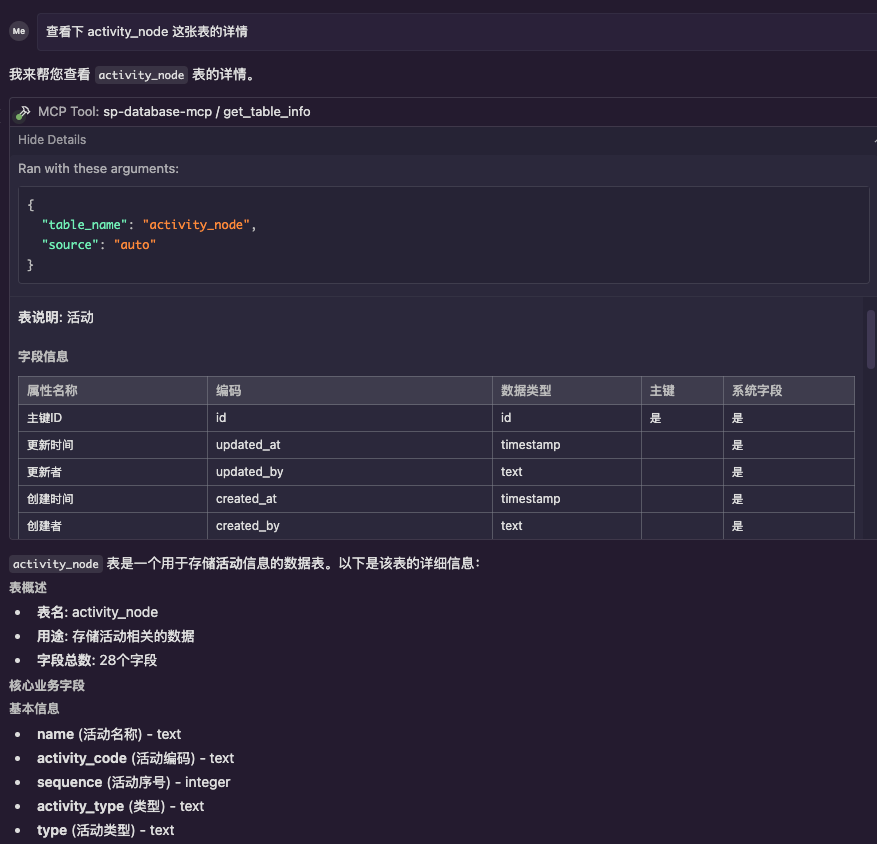
查询表结构信息
现在支持两种查询模式,系统会自动优先使用低代码系统的 schema 查询:
# 通过 MCP 工具查询表信息
# 输入:请获取 activity_node 表的详细信息

# 输出示例(低代码系统 schema 查询结果):
# activity_node 表结构信息
#
# **表说明**: 活动
#
# ## 字段信息
#
# | 字段名 | 类型 | 可空 | 默认值 | 主键 | 说明 |
# |--------|------|------|--------|------|---------|
# | id | BIGINT | 否 | - | 是 | 主键ID |
# | name | VARCHAR(1000) | 是 | - | 否 | 活动名称 |
# | activity_code | VARCHAR(64) | 是 | - | 否 | 活动编码 |
# | business_object_id | BIGINT | 是 | - | 否 | 业务对象id |
# | ... | ... | ... | ... | ... | ... |
查询模式说明
低代码系统 Schema 查询(优先)
查询
da_logic_entity表获取实体基本信息查询
da_entity_attribute表获取字段详细信息提供中文字段名、业务描述、数据类型等丰富信息
支持外键关系解析
传统数据库元数据查询(回退)
当低代码系统查询失败时自动回退
直接从数据库系统表获取技术字段信息
提供基础的字段类型、约束等信息
项目结构
sp-database-mcp/
├── sp_database_mcp/
│       ├── __init__.py
│       ├── server.py          # MCP 服务器主文件
│       ├── database.py        # 数据库连接和查询
│       ├── api_client.py      # API 客户端
│       └── models.py          # 数据模型
├── tests/
├── .env.example
├── pyproject.toml
└── README.md
开发
# 安装开发依赖
uv sync --dev

# 运行测试
uv run pytest

# 代码格式化
uv run black .
uv run isort .

# 类型检查
uv run mypy .