<p align="center">
<img src="assets/logo.png" alt="Universal DB MCP Logo" width="200">
</p>
<h1 align="center">Universal DB MCP</h1>
<p align="center">
<strong>Connect AI to Your Database with Natural Language</strong>
</p>
<p align="center">
A universal database connector implementing the Model Context Protocol (MCP) and HTTP API, enabling AI assistants to query and analyze your databases using natural language. Works with Claude Desktop, Cursor, Windsurf, VS Code, ChatGPT, and 50+ other platforms.
</p>
<p align="center">
<a href="https://www.npmjs.com/package/universal-db-mcp"><img src="https://img.shields.io/npm/v/universal-db-mcp.svg?style=flat-square&color=blue" alt="npm version"></a>
<a href="https://www.npmjs.com/package/universal-db-mcp"><img src="https://img.shields.io/npm/dm/universal-db-mcp.svg?style=flat-square&color=green" alt="npm downloads"></a>
<a href="https://opensource.org/licenses/MIT"><img src="https://img.shields.io/badge/License-MIT-yellow.svg?style=flat-square" alt="License: MIT"></a>
<a href="https://nodejs.org/"><img src="https://img.shields.io/badge/node-%3E%3D20.0.0-brightgreen?style=flat-square" alt="Node.js Version"></a>
<a href="https://github.com/Anarkh-Lee/universal-db-mcp/stargazers"><img src="https://img.shields.io/github/stars/Anarkh-Lee/universal-db-mcp?style=flat-square" alt="GitHub Stars"></a>
</p>
<p align="center">
<a href="#-features">Features</a> •
<a href="#-quick-start">Quick Start</a> •
<a href="#-supported-databases">Databases</a> •
<a href="#-documentation">Docs</a> •
<a href="#-contributing">Contributing</a>
</p>
<p align="center">
<a href="./README.md">English</a> | <a href="./README.zh-CN.md">中文文档</a>
</p>
---
## Why Universal DB MCP?
Imagine asking your AI assistant: *"Show me the top 10 customers by order value this month"* and getting instant results from your database - no SQL writing required. Universal DB MCP makes this possible by bridging AI assistants with your databases through the Model Context Protocol (MCP) and HTTP API.
```
You: "What's the average order value for users who signed up in the last 30 days?"
AI: Let me query that for you...
┌─────────────────────────────────────┐
│ Average Order Value: $127.45 │
│ Total New Users: 1,247 │
│ Users with Orders: 892 (71.5%) │
└─────────────────────────────────────┘
```
## ✨ Features
- **17 Database Support** - MySQL, PostgreSQL, Redis, Oracle, SQL Server, MongoDB, SQLite, and 10 Chinese domestic databases
- **55+ Platform Integrations** - Works with Claude Desktop, Cursor, VS Code, ChatGPT, Dify, and [50+ other platforms](#-supported-platforms)
- **Flexible Architecture** - 2 startup modes (stdio/http) with 4 access methods: MCP stdio, MCP SSE, MCP Streamable HTTP, and REST API
- **Security First** - Read-only mode by default prevents accidental data modifications
- **Intelligent Caching** - Schema caching with configurable TTL for blazing-fast performance
- **Batch Query Optimization** - Up to 100x faster schema retrieval for large databases
- **Schema Enhancement** - Table comments, implicit relationship inference for better Text2SQL accuracy
- **Data Masking** - Automatic sensitive data protection (phone, email, ID card, bank card, etc.)
### Performance Improvements
| Tables | Before | After | Improvement |
|--------|--------|-------|-------------|
| 50 tables | ~5s | ~200ms | **25x faster** |
| 100 tables | ~10s | ~300ms | **33x faster** |
| 500 tables | ~50s | ~500ms | **100x faster** |
## 🚀 Quick Start
### Installation
```bash
npm install -g universal-db-mcp
```
### MCP Mode (Claude Desktop)
Add to your Claude Desktop configuration file:
- **macOS**: `~/Library/Application Support/Claude/claude_desktop_config.json`
- **Windows**: `%APPDATA%\Claude\claude_desktop_config.json`
```json
{
"mcpServers": {
"my-database": {
"command": "npx",
"args": [
"universal-db-mcp",
"--type", "mysql",
"--host", "localhost",
"--port", "3306",
"--user", "root",
"--password", "your_password",
"--database", "your_database"
]
}
}
}
```
Restart Claude Desktop and start asking questions:
- *"Show me the structure of the users table"*
- *"Count orders from the last 7 days"*
- *"Find the top 5 products by sales"*
### HTTP API Mode
```bash
# Set environment variables
export MODE=http
export HTTP_PORT=3000
export API_KEYS=your-secret-key
# Start the server
npx universal-db-mcp
```
```bash
# Test the API
curl http://localhost:3000/api/health
```
### MCP SSE Mode (Dify and Remote Access)
When running in HTTP mode, the server also exposes MCP protocol endpoints via SSE (Server-Sent Events) and Streamable HTTP. This allows platforms like Dify to connect using the MCP protocol directly.
**SSE Endpoint (Legacy):**
```
GET http://localhost:3000/sse?type=mysql&host=localhost&port=3306&user=root&password=xxx&database=mydb
```
**Streamable HTTP Endpoint (MCP 2025 Spec, Recommended):**
```
POST http://localhost:3000/mcp
Headers:
X-DB-Type: mysql
X-DB-Host: localhost
X-DB-Port: 3306
X-DB-User: root
X-DB-Password: your_password
X-DB-Database: your_database
Body: MCP JSON-RPC request
```
| Endpoint | Method | Description |
|----------|--------|-------------|
| `/sse` | GET | Establish SSE connection (legacy) |
| `/sse/message` | POST | Send message to SSE session |
| `/mcp` | POST | Streamable HTTP endpoint (recommended) |
| `/mcp` | GET | SSE stream for Streamable HTTP |
| `/mcp` | DELETE | Close session |
See [Dify Integration Guide](./docs/integrations/DIFY.md) for detailed setup instructions.
## 📊 Supported Databases
| Database | Type | Default Port | Category |
|----------|------|--------------|----------|
| MySQL | `mysql` | 3306 | Open Source |
| PostgreSQL | `postgres` | 5432 | Open Source |
| Redis | `redis` | 6379 | NoSQL |
| Oracle | `oracle` | 1521 | Commercial |
| SQL Server | `sqlserver` | 1433 | Commercial |
| MongoDB | `mongodb` | 27017 | NoSQL |
| SQLite | `sqlite` | - | Embedded |
| Dameng (达梦) | `dm` | 5236 | Chinese |
| KingbaseES | `kingbase` | 54321 | Chinese |
| GaussDB | `gaussdb` | 5432 | Chinese (Huawei) |
| OceanBase | `oceanbase` | 2881 | Chinese (Ant) |
| TiDB | `tidb` | 4000 | Distributed |
| ClickHouse | `clickhouse` | 8123 | OLAP |
| PolarDB | `polardb` | 3306 | Cloud (Alibaba) |
| Vastbase | `vastbase` | 5432 | Chinese |
| HighGo | `highgo` | 5866 | Chinese |
| GoldenDB | `goldendb` | 3306 | Chinese (ZTE) |
## 🏗️ Architecture
```
┌─────────────────────────────────────────────────────────────────────────┐
│ Universal DB MCP │
├─────────────────────────────────────────────────────────────────────────┤
│ │
│ Startup Modes: │
│ ┌────────────────────────────┬────────────────────────────────────┐ │
│ │ stdio mode │ http mode │ │
│ │ (npm run start:mcp) │ (npm run start:http) │ │
│ └─────────────┬──────────────┴───────────────┬────────────────────┘ │
│ │ │ │
│ ▼ ▼ │
│ ┌─────────────────────────┐ ┌───────────────────────────────────┐ │
│ │ MCP Protocol │ │ HTTP Server │ │
│ │ (stdio transport) │ │ │ │
│ │ │ │ ┌─────────────────────────────┐ │ │
│ │ Tools: │ │ │ MCP Protocol │ │ │
│ │ • execute_query │ │ │ (SSE / Streamable HTTP) │ │ │
│ │ • get_schema │ │ │ │ │ │
│ │ • get_table_info │ │ │ Tools: (same as stdio) │ │ │
│ │ • clear_cache │ │ │ • execute_query │ │ │
│ │ • get_enum_values │ │ │ • get_schema │ │ │
│ │ • get_sample_data │ │ │ • get_table_info │ │ │
│ │ │ │ │ • clear_cache │ │ │
│ │ For: Claude Desktop, │ │ │ • get_enum_values │ │ │
│ │ Cursor, etc. │ │ │ • get_sample_data │ │ │
│ └─────────────┬───────────┘ │ │ │ │ │
│ │ │ │ For: Dify, Remote Access │ │ │
│ │ │ └──────────────┬──────────────┘ │ │
│ │ │ │ │ │
│ │ │ ┌──────────────┴──────────────┐ │ │
│ │ │ │ REST API │ │ │
│ │ │ │ │ │ │
│ │ │ │ Endpoints: │ │ │
│ │ │ │ • /api/connect │ │ │
│ │ │ │ • /api/query │ │ │
│ │ │ │ • /api/schema │ │ │
│ │ │ │ • ... (10+ endpoints) │ │ │
│ │ │ │ │ │ │
│ │ │ │ For: Coze, n8n, Custom │ │ │
│ │ │ └──────────────┬──────────────┘ │ │
│ │ └─────────────────┼─────────────────┘ │
│ │ │ │
│ └──────────────────┬───────────────┘ │
│ ▼ │
│ ┌──────────────────────────────────────────────────────────────────┐ │
│ │ Core Business Logic │ │
│ │ • Query Execution • Schema Caching │ │
│ │ • Safety Validation • Connection Management │ │
│ └──────────────────────────────────┬───────────────────────────────┘ │
│ ▼ │
│ ┌──────────────────────────────────────────────────────────────────┐ │
│ │ Database Adapter Layer │ │
│ │ MySQL │ PostgreSQL │ Redis │ Oracle │ MongoDB │ SQLite │ ... │ │
│ └──────────────────────────────────────────────────────────────────┘ │
│ │
└─────────────────────────────────────────────────────────────────────────┘
```
## 🔒 Security
By default, Universal DB MCP runs in **read-only mode**, blocking all write operations (INSERT, UPDATE, DELETE, DROP, etc.).
### Permission Modes
Fine-grained permission control is supported for flexible configuration:
| Mode | Allowed Operations | Description |
|------|-------------------|-------------|
| `safe` (default) | SELECT | Read-only, safest |
| `readwrite` | SELECT, INSERT, UPDATE | Read/write but no delete |
| `full` | All operations | Full control (dangerous!) |
| `custom` | Custom combination | Specify via `--permissions` |
**Permission Types:**
- `read` - SELECT queries (always included)
- `insert` - INSERT, REPLACE
- `update` - UPDATE
- `delete` - DELETE, TRUNCATE
- `ddl` - CREATE, ALTER, DROP, RENAME
**Usage Examples:**
```bash
# Read-only mode (default)
npx universal-db-mcp --type mysql ...
# Read/write but no delete
npx universal-db-mcp --type mysql --permission-mode readwrite ...
# Custom: only read and insert
npx universal-db-mcp --type mysql --permissions read,insert ...
# Full control (equivalent to --danger-allow-write)
npx universal-db-mcp --type mysql --permission-mode full ...
```
**Permission Configuration by Transport:**
> ⚠️ Different transports use different parameter naming conventions!
| Transport | Parameter Location | Permission Mode | Custom Permissions |
|-----------|-------------------|-----------------|-------------------|
| STDIO (Claude Desktop) | CLI args | `--permission-mode` | `--permissions` |
| SSE (Dify, etc.) | URL Query | `permissionMode` | `permissions` |
| Streamable HTTP | HTTP Header | `X-DB-Permission-Mode` | `X-DB-Permissions` |
| REST API | JSON Body | `permissionMode` | `permissions` |
**Best Practices:**
- Never enable write mode in production
- Use dedicated read-only database accounts
- Connect through VPN or bastion hosts
- Regularly audit query logs
## 🔌 Supported Platforms
Universal DB MCP works with any platform that supports the MCP protocol or REST API. Here's a comprehensive list:
### AI-Powered Code Editors & IDEs
| Platform | Access Method | Description | Guide |
|----------|---------------|-------------|-------|
| [Cursor](https://cursor.sh/) | MCP stdio | AI-powered code editor with built-in MCP support | [EN](./docs/integrations/CURSOR.md) / [中文](./docs/integrations/CURSOR.zh-CN.md) |
| [Windsurf](https://codeium.com/windsurf) | MCP stdio | Codeium's AI IDE with Cascade agent | [EN](./docs/integrations/WINDSURF.md) / [中文](./docs/integrations/WINDSURF.zh-CN.md) |
| [VS Code](https://code.visualstudio.com/) | MCP stdio / REST API | Via GitHub Copilot agent mode or Cline/Continue extensions | [EN](./docs/integrations/VSCODE.md) / [中文](./docs/integrations/VSCODE.zh-CN.md) |
| [Zed](https://zed.dev/) | MCP stdio | High-performance open-source code editor | [EN](./docs/integrations/ZED.md) / [中文](./docs/integrations/ZED.zh-CN.md) |
| [IntelliJ IDEA](https://www.jetbrains.com/idea/) | MCP stdio | JetBrains IDE with MCP support (2025.1+) | [EN](./docs/integrations/JETBRAINS.md) / [中文](./docs/integrations/JETBRAINS.zh-CN.md) |
| [PyCharm](https://www.jetbrains.com/pycharm/) | MCP stdio | JetBrains Python IDE | [EN](./docs/integrations/JETBRAINS.md) / [中文](./docs/integrations/JETBRAINS.zh-CN.md) |
| [WebStorm](https://www.jetbrains.com/webstorm/) | MCP stdio | JetBrains JavaScript IDE | [EN](./docs/integrations/JETBRAINS.md) / [中文](./docs/integrations/JETBRAINS.zh-CN.md) |
| [Android Studio](https://developer.android.com/studio) | MCP stdio | Via JetBrains MCP plugin | [EN](./docs/integrations/JETBRAINS.md) / [中文](./docs/integrations/JETBRAINS.zh-CN.md) |
| [Neovim](https://neovim.io/) | MCP stdio | Via MCPHub.nvim plugin | [EN](./docs/integrations/NEOVIM.md) / [中文](./docs/integrations/NEOVIM.zh-CN.md) |
| [Emacs](https://www.gnu.org/software/emacs/) | MCP stdio | Via mcp.el package | [EN](./docs/integrations/EMACS.md) / [中文](./docs/integrations/EMACS.zh-CN.md) |
### AI Coding Assistants
| Platform | Access Method | Description | Guide |
|----------|---------------|-------------|-------|
| [Claude Code](https://claude.ai/code) | MCP stdio | Anthropic's agentic coding tool | [EN](./docs/integrations/CLAUDE-CODE.md) / [中文](./docs/integrations/CLAUDE-CODE.zh-CN.md) |
| [GitHub Copilot](https://github.com/features/copilot) | MCP stdio | Agent mode in VS Code/JetBrains | [EN](./docs/integrations/GITHUB-COPILOT.md) / [中文](./docs/integrations/GITHUB-COPILOT.zh-CN.md) |
| [Cline](https://github.com/cline/cline) | MCP stdio / REST API | Autonomous coding agent for VS Code | [EN](./docs/integrations/CLINE.md) / [中文](./docs/integrations/CLINE.zh-CN.md) |
| [Continue](https://continue.dev/) | MCP stdio | Open-source AI code assistant | [EN](./docs/integrations/CONTINUE.md) / [中文](./docs/integrations/CONTINUE.zh-CN.md) |
| [Roo Code](https://github.com/roovet/roo-code) | MCP stdio | Fork of Cline for VS Code | [EN](./docs/integrations/ROO-CODE.md) / [中文](./docs/integrations/ROO-CODE.zh-CN.md) |
| [Sourcegraph Cody](https://sourcegraph.com/cody) | MCP stdio | AI coding assistant | [EN](./docs/integrations/SOURCEGRAPH-CODY.md) / [中文](./docs/integrations/SOURCEGRAPH-CODY.zh-CN.md) |
| [Amazon Q Developer](https://aws.amazon.com/q/developer/) | MCP stdio | AWS AI coding assistant | [EN](./docs/integrations/AMAZON-Q-DEVELOPER.md) / [中文](./docs/integrations/AMAZON-Q-DEVELOPER.zh-CN.md) |
| [Devin](https://devin.ai/) | MCP stdio | AI software engineer | [EN](./docs/integrations/DEVIN.md) / [中文](./docs/integrations/DEVIN.zh-CN.md) |
| [Goose](https://github.com/block/goose) | MCP stdio | Block's AI coding agent | [EN](./docs/integrations/GOOSE.md) / [中文](./docs/integrations/GOOSE.zh-CN.md) |
| [Gemini CLI](https://github.com/google-gemini/gemini-cli) | MCP stdio | Google's command-line AI tool | [EN](./docs/integrations/GEMINI-CLI.md) / [中文](./docs/integrations/GEMINI-CLI.zh-CN.md) |
### Desktop AI Chat Applications
| Platform | Access Method | Description | Guide |
|----------|---------------|-------------|-------|
| [Claude Desktop](https://claude.ai/download) | MCP stdio | Anthropic's official desktop app | [EN](./docs/integrations/CLAUDE-DESKTOP.md) / [中文](./docs/integrations/CLAUDE-DESKTOP.zh-CN.md) |
| [ChatGPT Desktop](https://openai.com/chatgpt/desktop/) | MCP SSE/Streamable HTTP | OpenAI's desktop app with MCP connectors | [EN](./docs/integrations/CHATGPT.md) / [中文](./docs/integrations/CHATGPT.zh-CN.md) |
| [Cherry Studio](https://github.com/kangfenmao/cherry-studio) | MCP stdio | Multi-model desktop chat app | [EN](./docs/integrations/CHERRY-STUDIO.md) / [中文](./docs/integrations/CHERRY-STUDIO.zh-CN.md) |
| [LM Studio](https://lmstudio.ai/) | MCP stdio | Run local LLMs with MCP support | [EN](./docs/integrations/LM-STUDIO.md) / [中文](./docs/integrations/LM-STUDIO.zh-CN.md) |
| [Jan](https://jan.ai/) | MCP stdio | Open-source ChatGPT alternative | [EN](./docs/integrations/JAN.md) / [中文](./docs/integrations/JAN.zh-CN.md) |
| [Msty](https://msty.app/) | MCP stdio | Desktop AI chat application | [EN](./docs/integrations/MSTY.md) / [中文](./docs/integrations/MSTY.zh-CN.md) |
| [LibreChat](https://github.com/danny-avila/LibreChat) | MCP stdio | Open-source chat interface | [EN](./docs/integrations/LIBRECHAT.md) / [中文](./docs/integrations/LIBRECHAT.zh-CN.md) |
| [Witsy](https://witsy.app/) | MCP stdio | Desktop AI assistant | [EN](./docs/integrations/WITSY.md) / [中文](./docs/integrations/WITSY.zh-CN.md) |
| [5ire](https://github.com/5ire-tech/5ire) | MCP stdio | Cross-platform AI chat | [EN](./docs/integrations/5IRE.md) / [中文](./docs/integrations/5IRE.zh-CN.md) |
| [ChatMCP](https://github.com/daodao97/chatmcp) | MCP stdio | MCP-focused chat UI | [EN](./docs/integrations/CHATMCP.md) / [中文](./docs/integrations/CHATMCP.zh-CN.md) |
| [HyperChat](https://github.com/BigSweetPotatoStudio/HyperChat) | MCP stdio | Multi-platform chat app | [EN](./docs/integrations/HYPERCHAT.md) / [中文](./docs/integrations/HYPERCHAT.zh-CN.md) |
| [Tome](https://github.com/runebook/tome) | MCP stdio | macOS app for local LLMs | [EN](./docs/integrations/TOME.md) / [中文](./docs/integrations/TOME.zh-CN.md) |
### Web-Based AI Platforms
| Platform | Access Method | Description | Guide |
|----------|---------------|-------------|-------|
| [Claude.ai](https://claude.ai/) | MCP SSE/Streamable HTTP | Anthropic's web interface | [EN](./docs/integrations/CLAUDE-AI.md) / [中文](./docs/integrations/CLAUDE-AI.zh-CN.md) |
| [ChatGPT](https://chat.openai.com/) | MCP SSE/Streamable HTTP | Via custom connectors | [EN](./docs/integrations/CHATGPT.md) / [中文](./docs/integrations/CHATGPT.zh-CN.md) |
| [Dify](https://dify.ai/) | MCP SSE/Streamable HTTP | LLM app development platform | [EN](./docs/integrations/DIFY.md) / [中文](./docs/integrations/DIFY.zh-CN.md) |
| [Coze](https://www.coze.com/) | REST API | ByteDance's AI bot platform | [EN](./docs/integrations/COZE.md) / [中文](./docs/integrations/COZE.zh-CN.md) |
| [n8n](https://n8n.io/) | REST API / MCP | Workflow automation platform | [EN](./docs/integrations/N8N.md) / [中文](./docs/integrations/N8N.zh-CN.md) |
| [Replit](https://replit.com/) | MCP stdio | Online IDE with AI agent | [EN](./docs/integrations/REPLIT.md) / [中文](./docs/integrations/REPLIT.zh-CN.md) |
| [MindPal](https://mindpal.io/) | MCP SSE/Streamable HTTP | No-code AI agent builder | [EN](./docs/integrations/MINDPAL.md) / [中文](./docs/integrations/MINDPAL.zh-CN.md) |
### Agent Frameworks & SDKs
| Platform | Access Method | Description | Guide |
|----------|---------------|-------------|-------|
| [LangChain](https://langchain.com/) | MCP stdio | Popular LLM framework | [EN](./docs/integrations/LANGCHAIN.md) / [中文](./docs/integrations/LANGCHAIN.zh-CN.md) |
| [Smolagents](https://github.com/huggingface/smolagents) | MCP stdio | Hugging Face agent library | [EN](./docs/integrations/SMOLAGENTS.md) / [中文](./docs/integrations/SMOLAGENTS.zh-CN.md) |
| [OpenAI Agents SDK](https://platform.openai.com/) | MCP SSE/Streamable HTTP | OpenAI's agent framework | [EN](./docs/integrations/OPENAI-AGENTS-SDK.md) / [中文](./docs/integrations/OPENAI-AGENTS-SDK.zh-CN.md) |
| [Amazon Bedrock Agents](https://aws.amazon.com/bedrock/) | MCP SSE/Streamable HTTP | AWS AI agent service | [EN](./docs/integrations/AMAZON-BEDROCK-AGENTS.md) / [中文](./docs/integrations/AMAZON-BEDROCK-AGENTS.zh-CN.md) |
| [Google ADK](https://cloud.google.com/) | MCP stdio | Google's Agent Development Kit | [EN](./docs/integrations/GOOGLE-ADK.md) / [中文](./docs/integrations/GOOGLE-ADK.zh-CN.md) |
| [Vercel AI SDK](https://sdk.vercel.ai/) | MCP stdio | Vercel's AI development kit | [EN](./docs/integrations/VERCEL-AI-SDK.md) / [中文](./docs/integrations/VERCEL-AI-SDK.zh-CN.md) |
| [Spring AI](https://spring.io/projects/spring-ai) | MCP stdio | Java/Spring AI framework | [EN](./docs/integrations/SPRING-AI.md) / [中文](./docs/integrations/SPRING-AI.zh-CN.md) |
### CLI Tools & Terminal
| Platform | Access Method | Description | Guide |
|----------|---------------|-------------|-------|
| [Claude Code CLI](https://claude.ai/code) | MCP stdio | Terminal-based coding agent | [EN](./docs/integrations/CLAUDE-CODE.md) / [中文](./docs/integrations/CLAUDE-CODE.zh-CN.md) |
| [Warp](https://www.warp.dev/) | MCP stdio | AI-powered terminal | [EN](./docs/integrations/WARP.md) / [中文](./docs/integrations/WARP.zh-CN.md) |
| [Oterm](https://github.com/ggozad/oterm) | MCP stdio | Chat with Ollama via CLI | [EN](./docs/integrations/OTERM.md) / [中文](./docs/integrations/OTERM.zh-CN.md) |
| [MCPHost](https://github.com/mark3labs/mcphost) | MCP stdio | CLI chat with LLMs | [EN](./docs/integrations/MCPHOST.md) / [中文](./docs/integrations/MCPHOST.zh-CN.md) |
### Productivity & Automation
| Platform | Access Method | Description | Guide |
|----------|---------------|-------------|-------|
| [Raycast](https://raycast.com/) | MCP stdio | macOS productivity launcher | [EN](./docs/integrations/RAYCAST.md) / [中文](./docs/integrations/RAYCAST.zh-CN.md) |
| [Notion](https://notion.so/) | MCP SSE/Streamable HTTP | Workspace with AI integration | [EN](./docs/integrations/NOTION.md) / [中文](./docs/integrations/NOTION.zh-CN.md) |
| [Obsidian](https://obsidian.md/) | MCP stdio | Via MCP Tools plugin | [EN](./docs/integrations/OBSIDIAN.md) / [中文](./docs/integrations/OBSIDIAN.zh-CN.md) |
| [Home Assistant](https://www.home-assistant.io/) | MCP stdio | Home automation platform | [EN](./docs/integrations/HOME-ASSISTANT.md) / [中文](./docs/integrations/HOME-ASSISTANT.zh-CN.md) |
### Messaging Platform Integrations
| Platform | Access Method | Description | Guide |
|----------|---------------|-------------|-------|
| [Slack](https://slack.com/) | MCP stdio / REST API | Via Slack MCP bots | [EN](./docs/integrations/SLACK.md) / [中文](./docs/integrations/SLACK.zh-CN.md) |
| [Discord](https://discord.com/) | MCP stdio / REST API | Via Discord MCP bots | [EN](./docs/integrations/DISCORD.md) / [中文](./docs/integrations/DISCORD.zh-CN.md) |
| [Mattermost](https://mattermost.com/) | MCP stdio | Open-source messaging | [EN](./docs/integrations/MATTERMOST.md) / [中文](./docs/integrations/MATTERMOST.zh-CN.md) |
### Local LLM Runners
| Platform | Access Method | Description | Guide |
|----------|---------------|-------------|-------|
| [Ollama](https://ollama.ai/) | MCP stdio | Run local LLMs | [EN](./docs/integrations/OLLAMA.md) / [中文](./docs/integrations/OLLAMA.zh-CN.md) |
| [LM Studio](https://lmstudio.ai/) | MCP stdio | Local LLM desktop app | [EN](./docs/integrations/LM-STUDIO.md) / [中文](./docs/integrations/LM-STUDIO.zh-CN.md) |
| [Jan](https://jan.ai/) | MCP stdio | Offline ChatGPT alternative | [EN](./docs/integrations/JAN.md) / [中文](./docs/integrations/JAN.zh-CN.md) |
### Development & Testing Tools
| Platform | Access Method | Description | Guide |
|----------|---------------|-------------|-------|
| [MCP Inspector](https://github.com/modelcontextprotocol/inspector) | MCP stdio | Official MCP debugging tool | [EN](./docs/integrations/MCP-INSPECTOR.md) / [中文](./docs/integrations/MCP-INSPECTOR.zh-CN.md) |
| [Postman](https://postman.com/) | REST API / MCP | API testing platform | [EN](./docs/integrations/POSTMAN.md) / [中文](./docs/integrations/POSTMAN.zh-CN.md) |
> **Note**: Any MCP-compatible client can connect via stdio (local) or SSE/Streamable HTTP (remote). Any HTTP client can use the REST API.
## 📚 Documentation
### Getting Started
- [Installation Guide](./docs/getting-started/installation.md)
- [Quick Start](./docs/getting-started/quick-start.md)
- [Configuration](./docs/getting-started/configuration.md)
- [Usage Examples](./docs/getting-started/examples.md)
### Deployment
- [Deployment Overview](./docs/deployment/README.md)
- [Local Deployment](./docs/deployment/local.md)
- [Docker Deployment](./docs/deployment/docker.md)
- [Cloud Deployment](./docs/deployment/cloud/)
### Database Guides
- [Database Support Overview](./docs/databases/README.md)
- [MySQL](./docs/databases/mysql.md)
- [PostgreSQL](./docs/databases/postgresql.md)
- [More databases...](./docs/databases/)
### HTTP API
- [API Reference](./docs/http-api/API_REFERENCE.md)
- [Deployment Guide](./docs/http-api/DEPLOYMENT.md)
### Integrations
**AI Editors & IDEs:**
[Cursor](./docs/integrations/CURSOR.md) |
[VS Code](./docs/integrations/VSCODE.md) |
[JetBrains](./docs/integrations/JETBRAINS.md) |
[Windsurf](./docs/integrations/WINDSURF.md) |
[Zed](./docs/integrations/ZED.md) |
[Neovim](./docs/integrations/NEOVIM.md) |
[Emacs](./docs/integrations/EMACS.md)
**AI Assistants:**
[Claude Desktop](./docs/integrations/CLAUDE-DESKTOP.md) |
[Claude Code](./docs/integrations/CLAUDE-CODE.md) |
[GitHub Copilot](./docs/integrations/GITHUB-COPILOT.md) |
[Cline](./docs/integrations/CLINE.md) |
[Continue](./docs/integrations/CONTINUE.md)
**AI Platforms:**
[Dify](./docs/integrations/DIFY.md) |
[Coze](./docs/integrations/COZE.md) |
[n8n](./docs/integrations/N8N.md) |
[ChatGPT](./docs/integrations/CHATGPT.md) |
[LangChain](./docs/integrations/LANGCHAIN.md)
**Desktop Apps:**
[Cherry Studio](./docs/integrations/CHERRY-STUDIO.md) |
[LM Studio](./docs/integrations/LM-STUDIO.md) |
[Jan](./docs/integrations/JAN.md) |
[Ollama](./docs/integrations/OLLAMA.md)
**Messaging:**
[Slack](./docs/integrations/SLACK.md) |
[Discord](./docs/integrations/DISCORD.md)
**Tools:**
[MCP Inspector](./docs/integrations/MCP-INSPECTOR.md) |
[Postman](./docs/integrations/POSTMAN.md)
> 📁 [View all 55 integration guides](./docs/integrations/) | 中文版本请在对应文档名后加 `.zh-CN`
### Advanced
- [Security Guide](./docs/guides/security.md)
- [Multi-tenant Guide](./docs/guides/multi-tenant.md)
- [Architecture](./docs/development/architecture.md)
- [Troubleshooting](./docs/operations/troubleshooting.md)
## 🤝 Contributing
Contributions are welcome! Please read our [Contributing Guide](./CONTRIBUTING.md) before submitting a Pull Request.
```bash
# Clone the repository
git clone https://github.com/Anarkh-Lee/universal-db-mcp.git
# Install dependencies
npm install
# Build
npm run build
# Run tests
npm test
```
## 📄 License
This project is licensed under the [MIT License](./LICENSE).
## 🌟 Star History
If you find this project useful, please consider giving it a star! Your support helps us continue improving Universal DB MCP.
[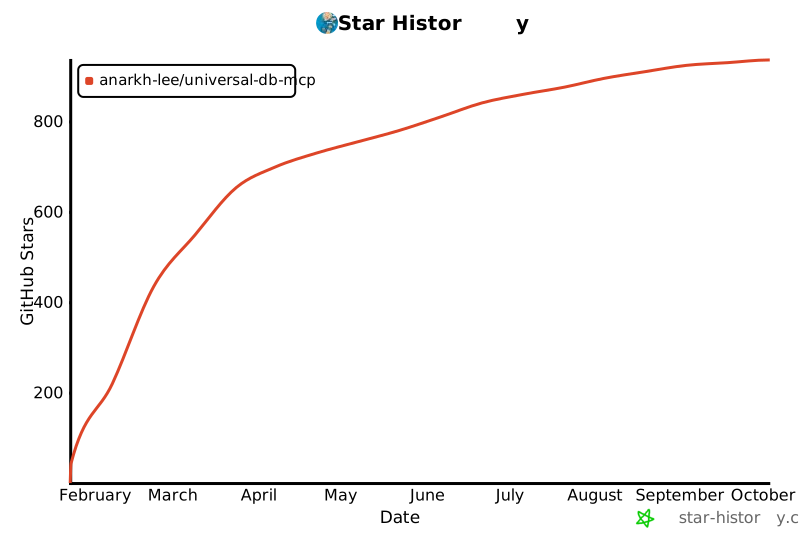](https://star-history.com/#Anarkh-Lee/universal-db-mcp&Date)
## 📝 Changelog
See [CHANGELOG.md](./CHANGELOG.md) for a detailed version history.
---
<p align="center">
Made with ❤️ by <a href="https://github.com/Anarkh-Lee">Anarkh-Lee</a>
</p>
